Your vulnerability scanner just flagged your Azure DevOps Server for SSH cipher problems. Maybe it's CBC ciphers, maybe it's weak key exchange algorithms, maybe it's diffie-hellman-group1-sha1. These are common findings and they're all fixable. But before you start tweaking cipher configurations, there's a much simpler question worth asking first: is anyone actually using SSH for Git access?
Because if the answer is "nobody," you can just disable the SSH service and clear all the findings in one shot.
What's the SSH Service For, Anyway?
Azure DevOps Server gives developers two ways to clone and interact with Git repositories: HTTPS and SSH. The SSH option requires the Azure DevOps SSH service to be running on the application tier. Developers who want to use SSH have to generate an RSA key pair, upload their public key to their Azure DevOps profile, and then use SSH URLs (starting with ssh://) instead of HTTPS URLs for their Git remotes.
In my experience, SSH usage on enterprise Azure DevOps Server installations is pretty rare. Most Windows shops use HTTPS with Git Credential Manager or Personal Access Tokens. SSH tends to be more of a Linux/Mac developer preference, and if you're running Azure DevOps Server on-prem, you're almost certainly a Windows shop.
The Common Vulnerability Scanner Findings
Here are the three findings that typically come back from a vulnerability scan:
ssh-cbc-ciphers - The SSH server is offering older CBC (Cipher Block Chaining) mode encryption. The fix is to restrict it to CTR or AEAD mode ciphers.
ssh-weak-kex-algorithms - The server is advertising older, weaker key exchange algorithms during the SSH handshake.
ssh-cve-2015-4000 (diffie-hellman-group1-sha1) - The server supports DH group1 which uses a 1024-bit prime. This is the Logjam vulnerability and it's the most urgent of the three.
Can You Check Usage via REST API?
Short answer: not really. The cloud version of Azure DevOps has an SSH public keys API at _apis/ssh/publickeys but this endpoint doesn't exist on the on-premises version. I tried it and got nothing useful.
Similarly, the Azure DevOps Auditing feature that tracks access patterns is cloud-only. It doesn't work for on-premises Azure DevOps Server deployments.
So we need to go to the database.
Finding SSH Key Registrations in the Database
For a developer to use SSH with Azure DevOps Server, they must register their public key through the web portal (User Settings > SSH Public Keys). That key registration gets stored in the Azure DevOps configuration database. If nobody has registered an SSH key, nobody can be using SSH for Git operations. Period.
Here's where it gets interesting. There's no tbl_SshPublicKey table. The SSH public key data is stored in a table called tbl_DelegatedAuthorizationAccessKeyPublicData. And here's the trick: this table is empty until someone actually registers an SSH key. So if you query it and get zero rows, you're done. Nobody is using SSH.
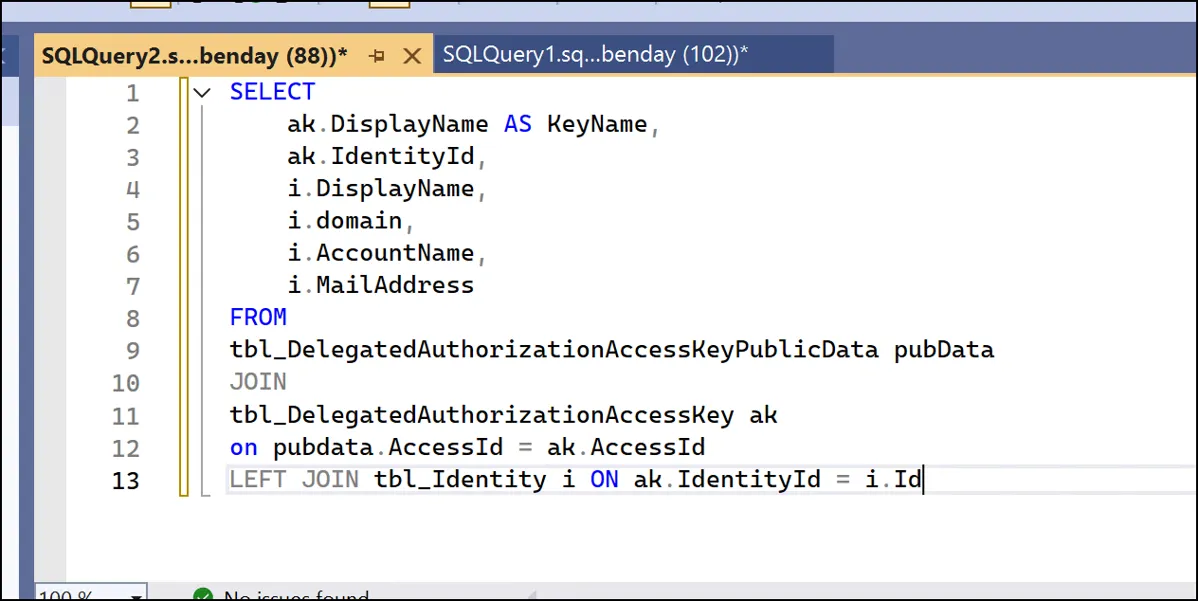
Run this query against your Azure DevOps configuration database (typically named AzureDevOps_Configuration or Tfs_Configuration):
SELECT
    ak.DisplayName AS KeyName,
    ak.IdentityId,
    i.DisplayName,
    i.domain,
    i.AccountName,
    i.MailAddress
FROM
    tbl_DelegatedAuthorizationAccessKeyPublicData pubData
JOIN
    tbl_DelegatedAuthorizationAccessKey ak
    ON pubdata.AccessId = ak.AccessId
LEFT JOIN
    tbl_Identity i ON ak.IdentityId = i.Id
This joins the SSH public key data to the access key table and then resolves the identity to give you the actual username, domain, and email address of anyone who has registered an SSH key.
If this query returns zero rows, nobody has SSH keys registered and nobody is using SSH for Git access.

If Nobody Is Using SSH: Disable the Service
If the query comes back empty, the simplest remediation for all three vulnerability findings is to disable the SSH service entirely. Stop the service, disable it, and optionally block the port at the firewall level. That eliminates the entire attack surface and clears all three findings at once.
If Someone IS Using SSH: Harden the Ciphers
If you do find users with SSH keys registered, you'll need to harden the cipher configuration instead. Azure DevOps Server stores its SSH configuration in the database, and you can change it using the prc_SetRegistryValue stored procedure.
Run these against your configuration database to fix the weak ciphers and key exchange algorithms:
-- Fix the weak KEX algorithms
-- (addresses both the weak KEX and diffie-hellman-group1-sha1 findings)
exec prc_SetRegistryValue 1,
    '#\Configuration\SshServer\KexInitOptions\kex_algorithms\',
    'diffie-hellman-group-exchange-sha256'

-- Fix the CBC cipher issue (force CTR mode)
exec prc_SetRegistryValue 1,
    '#\Configuration\SshServer\KexInitOptions\encryption_algorithms\',
    'aes128-ctr,aes256-ctr'
Restart the SSH service after making these changes and then re-run your vulnerability scan to confirm the findings are resolved.
Credit to this Microsoft Q&A thread for the prc_SetRegistryValue approach.
Also Worth Knowing: SSH-RSA Deprecation Is Coming
Microsoft has been deprecating SSH-RSA as a host key algorithm across Azure DevOps. Azure DevOps Server 2022.2 added support for RSA-SHA2-256 and RSA-SHA2-512, and the upcoming 2022.3 release will drop SSH-RSA support entirely. So if you do have SSH users, they'll need to be on the newer key types before you upgrade. More details in Microsoft's deprecation announcement.
Summary
Before you start hardening SSH ciphers on your Azure DevOps Server, check whether anyone is actually using SSH. Query tbl_DelegatedAuthorizationAccessKeyPublicData in your configuration database. If it's empty, just disable the SSH service and move on with your life. If it's not empty, harden the ciphers using prc_SetRegistryValue and plan for the SSH-RSA deprecation.
I hope this helps.
-Ben