This is Chapter 12 of Azure Cosmos DB for .NET Developers. Previous: Chapter 11: Querying Cosmos — LINQ, SQL, and Knowing What Runs.
It's the age of artificial intelligence, right? So how could anyone possibly do anything without talking about AI even if it's not especially relevant? AI all the time. With an extra helping of AI with some whipped cream and AI cherries on top. As you can tell, I'm a little burned out on hearing "AI" every 9 seconds. And I'm well and truly done with all the products that make an API call to an LLM, rebrand themselves as an AI company, and proceed to get endless venture capital cash.
But for Cosmos DB, there really is a legitimate AI angle. Cosmos DB supports three key things that help enable AI features and AI integrations in your apps: vector search, vector indexing, and vector similarity queries.
At the end of Chapter 11, I teased the idea that we'll add AI-powered vector search to the cocktail database app for about $0.01. And here it begins.
Vector Distance Searches
Everything in the cocktail app up to this point has been keyword search. Search by title matches text. Search by ingredient matches text. Even the multi-ingredient AND search — fancy as the queries can get — just matches text. If you search for "bourbon," you get recipes with the word "bourbon" in the ingredients.
If you search for something that's a little more natural language-y like "something dark and smoky", you'd get nothing. The word "dark" doesn't appear in any ingredient name. Neither does "smoky." The search engine so far is literally literal.
Vector search changes that. Instead of matching text, it matches meaning. "Something dark and smoky with mezcal" has zero keyword overlap with "Oaxacan Old Fashioned" — but they're conceptually close. Vector search finds that connection. And the wild part is: it happens inside the same Cosmos container, using the same partition layout, queried with the same Cosmos SQL. No separate vector database. No Pinecone. No Qdrant. Just a float[] property on the recipe document and a SQL function called VectorDistance.
What's an Embedding?
So what we're trying to do is enable search based on fuzzy meaning rather than boolean "does this string exist" text searches. Now I don't know about you but as a long time software developer when I hear someone say "yah...we're going to search on 'meaning'", I kind of shudder. It's one of those things that a non-programmer says that sounds so completely obvious to other humans but to a programmer it begs the question: "what is meaning and how do we store it?"
We need some kind of storable abstraction that represents this vague notion of 'meaning'. And then we need a way to essentially compare one meaning (our search query) to all the meanings (the cocktail recipes) that are stored in our Cosmos DB container.
Sounds impossible. And on that note, I'm done writing and this book is over. Thanks so much for coming. Good luck.
OMG I wish I could do that. Wouldn't that be kind of hilarious? The author of a book hits something that's too difficult and they just 'nope out' of the book and fill the rest of the pages with "lorem ipsum" text. Ehhh I'm just gunna go for it.
Lorem ipsum dolor sit amet, consectetur adipiscing elit, sed do eiusmod tempor incididunt ut labore et dolore...I'm just kidding. Continuing on.
The meaning is generated by an AI model and it's known as an embedding or a vector.
An embedding is a list of numbers — a vector — that represents the meaning of a piece of text. You feed a string into an embedding model, and it hands you back an array of floating-point numbers. For the model we're using (text-embedding-3-small from Azure OpenAI), that array is 1,536 numbers long.
Those numbers aren't human-readable. You can't look at position 847 of the array and say "ah, that's the bourbon-ness dimension." But the model has learned, from training on enormous amounts of text, to place semantically similar things near each other in that 1,536-dimensional space. "Rye whiskey" and "bourbon" end up close together. "Smoky mezcal cocktail" and "Oaxacan Old Fashioned" end up close together. "Gin and tonic" and "margarita" end up farther apart. The embedding is essentially the AI model's interpretation of the recipe.
In order to determine similarity, you do some math and compare the vectors. Out of that comparison comes a similarity score. In Cosmos DB, there's a function that's available via SQL query called VectorDistance that compares two vectors and returns the semantic similarity score.
Sort the results by that generated similarity score and that's your semantic search engine. I've got to say that I was seriously surprised by how simple this was to implement.
What Gets Embedded (And Why It Matters)
The most important design decision in the whole vector search feature isn't the model or the database configuration or the query syntax. It's what text you feed into the embedding model. Get this wrong and your search results will be garbage regardless of how good the model is.
Here's the method that builds the embedding text for each recipe:
public static class RecipeEmbeddingHelper
{
    public static string GetEmbeddingText(CocktailRecipe recipe)
    {
        var ingredientDescriptions = recipe.Ingredients
            .Where(i => string.IsNullOrWhiteSpace(i.Name) == false)
            .Select(i => string.IsNullOrWhiteSpace(i.Secondary)
                ? i.Name
                : $"{i.Secondary} ({i.Name})");

        var ingredients = string.Join(", ", ingredientDescriptions);

        var name = recipe.Name?.Trim() ?? string.Empty;
        var description = recipe.Description?.Trim() ?? string.Empty;

        if (ingredients.Length == 0)
        {
            return $"{name}: {description}".Trim(':', ' ');
        }

        return $"{name}: {description} Ingredients: {ingredients}".Trim(':', ' ');
    }
}
Here's an example using the recipe for a "Tailspin".
Tailspin

Ingredients:
1 oz Gin · Gin
0.75 oz Sweet vermouth · Vermouth
0.75 oz Green chartreuse · Herbal Liqueur
1 dash Orange bitters · Bitters

Instructions:
Stir in mixing glass and garnish with lemon twist, cherry, or olive.
Using that recipe as a source, output that gets fed in for the embedding becomes the following:
Tailspin: Stir and strain Ingredients: Gin (Gin), Vermouth (Sweet vermouth), Herbal Liqueur (Green chartreuse)
Notice the ingredient format: Herbal Liqueur (Green chartreuse). That's the taxonomy Secondary category followed by the raw ingredient name. This is the key design decision and it's the whole reason the ingredient classification system from Chapter 10 exists.
Without the taxonomy context, the embedding text would be:
Tailspin: Stir and strain Ingredients: Gin, Sweet vermouth, Green chartreuse
That would work for recipes where the ingredient names are obvious — everybody knows gin is a spirit. But what about "Carpano Antica"? Or "Punt e Mes"? Or "Dolin Blanc"? Those are all vermouths, but the embedding model probably won't know that. By prepending the category — Vermouth (Carpano Antica), Vermouth (Punt e Mes), Vermouth (Dolin Blanc) — we're teaching the model that these are all the same kind of thing. The embedding will capture "vermouth-ness" even for obscure brand names.
This is what I mean when I say the embedding text is the most important design decision. The model can only work with what you give it. If you give it brand names it doesn't recognize, the embeddings will be noisy. If you give it category + brand name, the embeddings capture the flavor profile of the recipe, not just its ingredient list.
I have unit tests for this:
[Fact]
public void GetEmbeddingText_IncludesSecondaryContextForClassifiedIngredients()
{
    var recipe = new CocktailRecipe
    {
        Name = "Tailspin",
        Description = "Stir and strain",
        Ingredients =
        {
            new Ingredient { Name = "Gin", Secondary = "Gin" },
            new Ingredient { Name = "Sweet vermouth", Secondary = "Vermouth" },
            new Ingredient { Name = "Green chartreuse", Secondary = "Herbal Liqueur" }
        }
    };

    var text = RecipeEmbeddingHelper.GetEmbeddingText(recipe);

    Assert.Equal(
        "Tailspin: Stir and strain Ingredients: Gin (Gin), Vermouth (Sweet vermouth), Herbal Liqueur (Green chartreuse)",
        text);
}

[Fact]
public void GetEmbeddingText_FallsBackToNameOnlyForUnclassifiedIngredients()
{
    var recipe = new CocktailRecipe
    {
        Name = "Mystery",
        Description = "Stir",
        Ingredients =
        {
            new Ingredient { Name = "Obscure bitters", Secondary = "" }
        }
    };

    var text = RecipeEmbeddingHelper.GetEmbeddingText(recipe);

    Assert.Equal("Mystery: Stir Ingredients: Obscure bitters", text);
}
When an ingredient doesn't have a classification (the Secondary field is empty), the helper falls back to just the raw name. Better to give the model something than nothing.
Container Setup: The Vector Policies
Before you can query vector embeddings with VectorDistance, you need to configure two things on your container: a vector embedding policy and a vector indexing policy.
A note on timing: Microsoft's docs have been inconsistent about whether you can add these to an existing container. Several pages say the policies must be set at container creation time. I can tell you from experience that this isn't true — I added the vector policies to the cocktail app's container well after it was created and already had thousands of documents in it. Here's exactly how I did it.
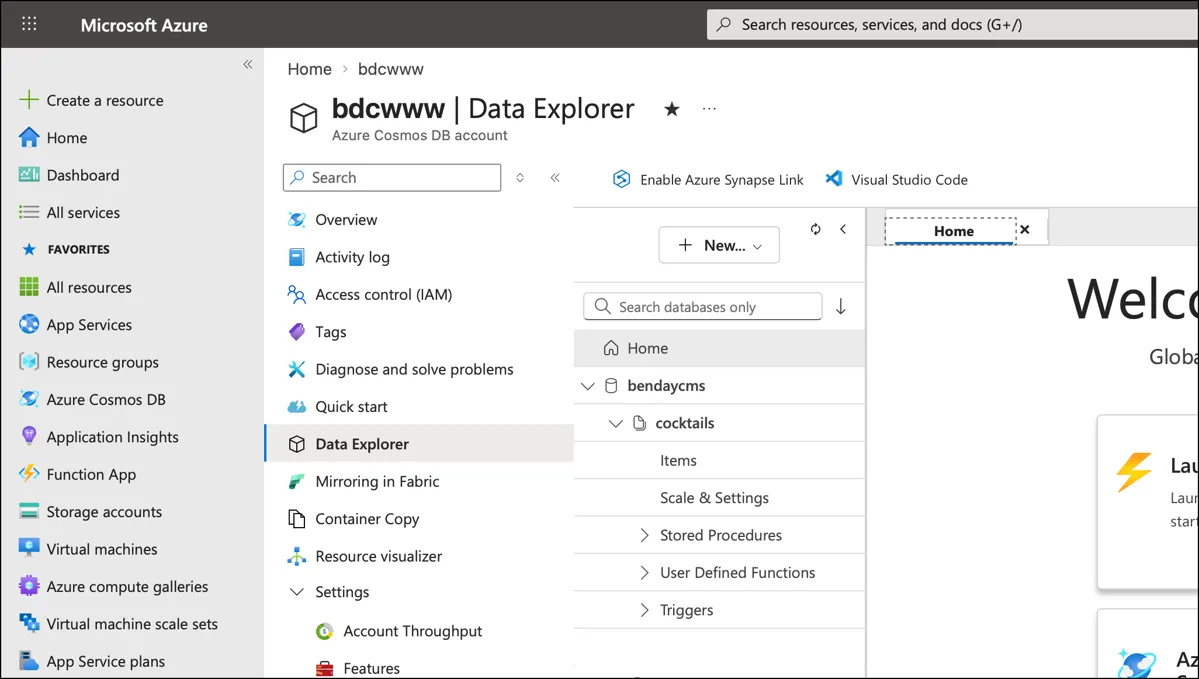
Step 1: Open the Azure Portal
The first step is to open the Azure Portal (https://portal.azure.com), navigate to your Cosmos DB account, and then navigate to the Data Explorer.
Step 2: Open the Container Policies Tab
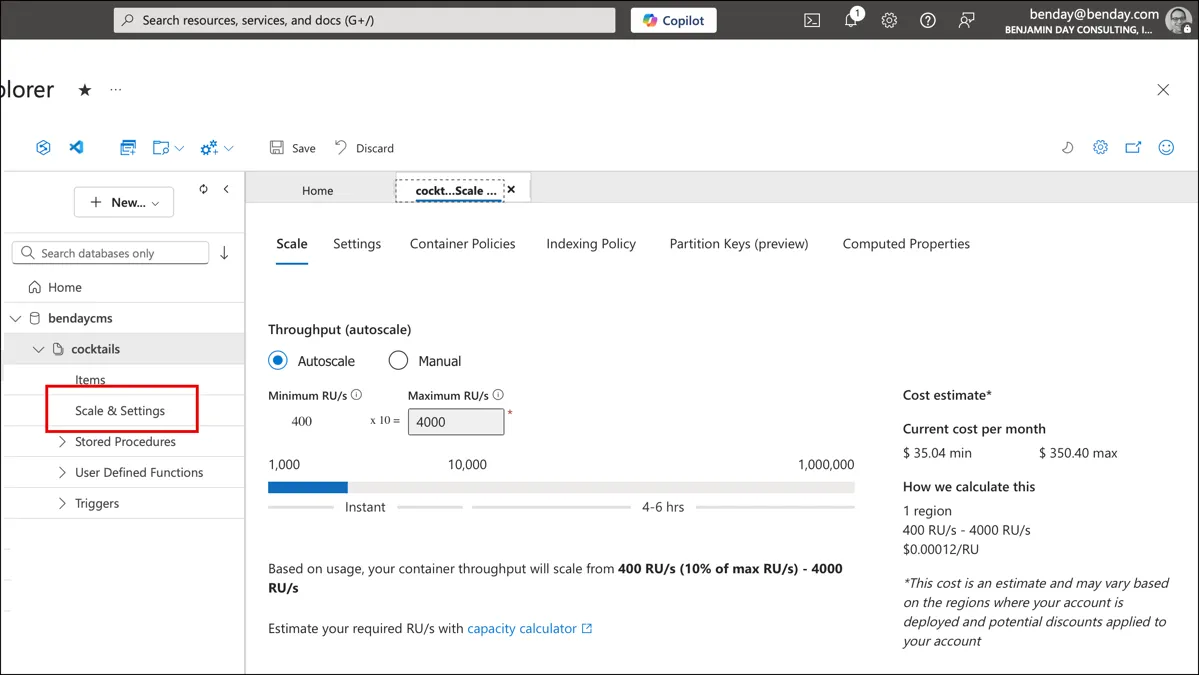
Once you're navigated to your Cosmos DB account's Data Explorer, expand your database and container in the left nav. You should now see Scale & Settings.
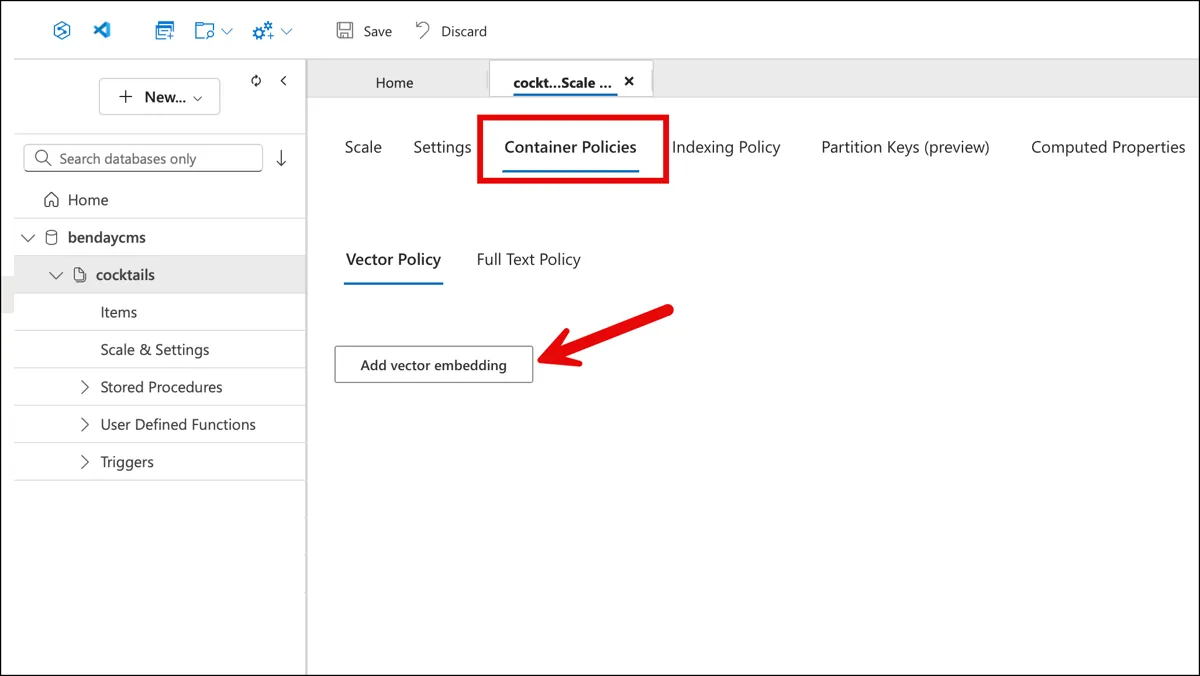
Select the Container Policies tab, then the Vector Policy sub-tab. If you haven't configured vector search yet, you'll see an empty page with an "Add vector embedding" button.
Step 3: Add a Vector Embedding
Click Add vector embedding. The portal opens a form with four fields, pre-populated with defaults that you'll need to change. The defaults — path /vector1, distance function euclidean, dimensions 0 — aren't what you want.
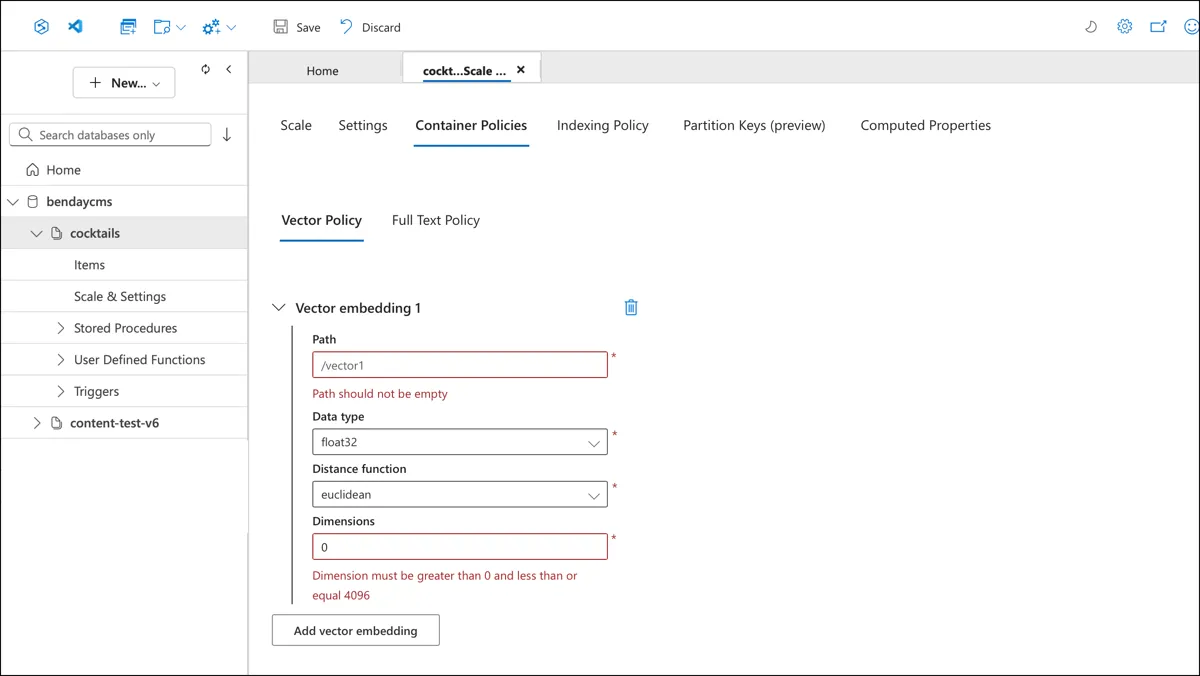
Step 4: Configure the Embedding
Fill in the actual values for your embedding:
- Path:
/embedding— the JSON path where the vector array lives on your documents - Data type:
float32— matches whattext-embedding-3-smallproduces - Distance function:
cosine— the standard choice for text embeddings. Cosine distance measures the angle between vectors rather than the absolute distance, which means it's insensitive to vector magnitude and only cares about direction - Dimensions:
1536— the output size oftext-embedding-3-small
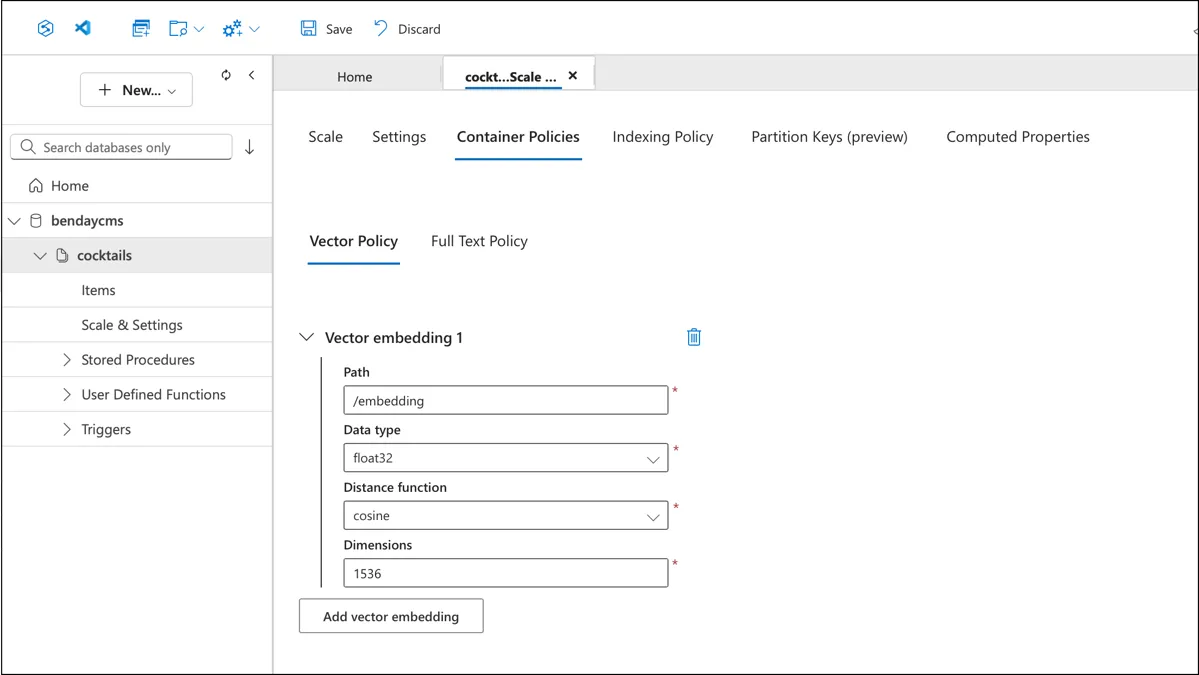
Step 5: Save the Vector Policy
Click Save in the toolbar. After saving, the fields become read-only — the policy is now part of your container configuration.
Step 6: Update the Indexing Policy
Now switch to the Indexing Policy tab. This is a JSON editor. Before adding vector search, your indexing policy looks something like this — the default /* included path, _etag excluded, nothing else:
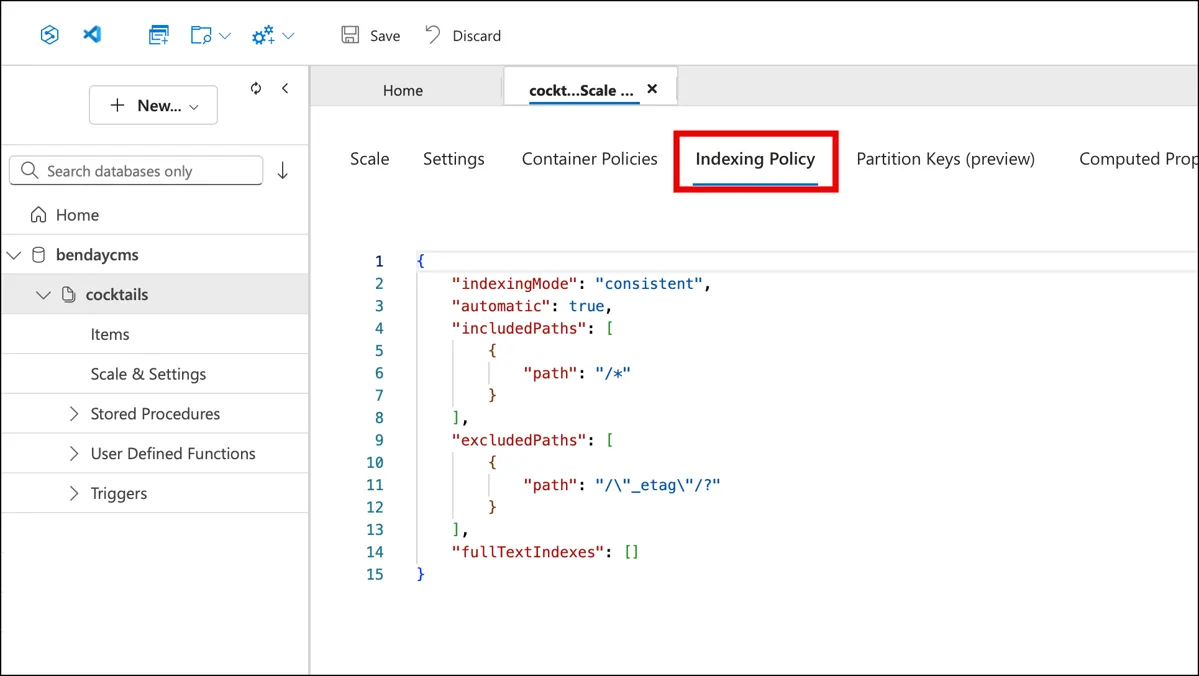
You need to make two changes to this JSON. First, add /embedding/* to the excludedPaths array — this prevents Cosmos from trying to create standard range indexes over each of the 1,536 float values in the embedding array, which would be pointless and expensive. Second, add a vectorIndexes section with the path and index type:
"excludedPaths": [
    { "path": "/\"_etag\"/?" },
    { "path": "/embedding/*" }
],
"vectorIndexes": [
    {
        "path": "/embedding",
        "type": "diskANN"
    }
]
DiskANN is Microsoft Research's approximate nearest-neighbor indexing algorithm — it's designed for disk-resident vectors and gives you fast approximate results without loading every vector into memory. The alternative is flat, which does exact nearest-neighbor search by comparing your query vector against every single document. For 5,800 recipes, flat would probably be fine. For a million documents, you want DiskANN.
Click Save again. The updated indexing policy now includes the vector index and the embedding exclusion:
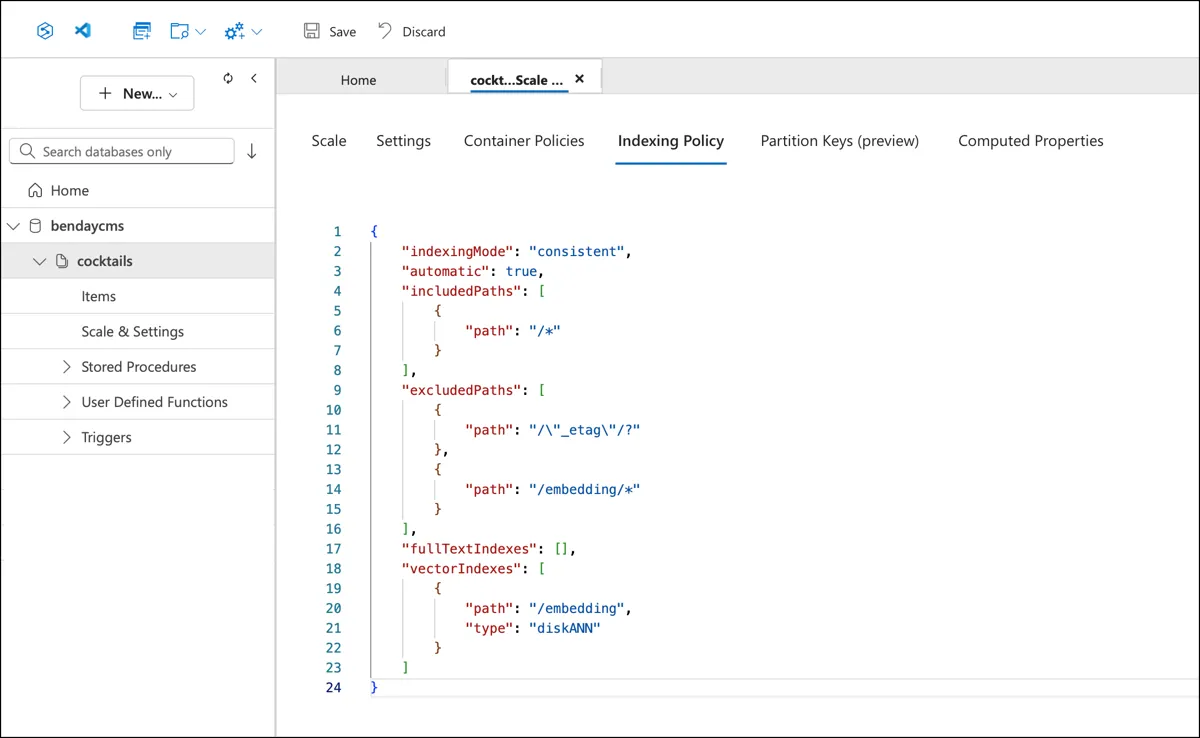
That's it. Your existing container — with all its existing data — is now configured for vector search. No migration, no new container, no data movement. The documents that don't have an embedding property yet are fine; they'll just be skipped by the IS_DEFINED(c.embedding) filter in the vector search query.
The Embedding Pipeline
With the container configured, we need to actually generate the embeddings. This is a batch process — run it once to populate all the vectors, then again whenever new recipes are added.
The Azure OpenAI Service
The embedding service wraps the Azure OpenAI client:
public class AzureOpenAIEmbeddingService : IEmbeddingService
{
    private readonly EmbeddingClient _client;
    private readonly int _dimensions;

    public AzureOpenAIEmbeddingService(
        IOptions<AzureOpenAIOptions> options,
        ILogger<AzureOpenAIEmbeddingService> logger)
    {
        var config = options.Value;
        _dimensions = config.EmbeddingDimensions;

        var azure = new AzureOpenAIClient(
            new Uri(config.Endpoint),
            new ApiKeyCredential(config.ApiKey));

        _client = azure.GetEmbeddingClient(config.EmbeddingDeployment);
    }

    public async Task<float[]> GetEmbeddingAsync(
        string text, CancellationToken cancellationToken = default)
    {
        var options = new EmbeddingGenerationOptions
        {
            Dimensions = _dimensions
        };

        var response = await CallWithRetryAsync(
            async () => await _client.GenerateEmbeddingAsync(
                text, options, cancellationToken),
            cancellationToken);

        return response.Value.ToFloats().ToArray();
    }
}
The configuration is minimal:
{
  "AzureOpenAI": {
    "Endpoint": "https://your-instance.openai.azure.com/",
    "ApiKey": "",
    "EmbeddingDeployment": "text-embedding-3-small",
    "EmbeddingDimensions": 1536
  }
}
text-embedding-3-small is the model. It's fast, it's cheap, and the quality is more than sufficient for ingredient-level semantic search. The 1,536-dimension output is the standard dimension for this model.
The CallWithRetryAsync method handles transient errors — 429 rate limits and 5xx server errors — with exponential backoff. When you're embedding 5,800 recipes in parallel, you're going to hit rate limits. The retry logic waits and tries again.
The Batch Command
The batch embedding is a CLI command:
await Parallel.ForEachAsync(toEmbed, parallelOptions, async (recipe, ct) =>
{
    var text = RecipeEmbeddingHelper.GetEmbeddingText(recipe);
    var vector = await embeddingService.GetEmbeddingAsync(text, ct);
    recipe.Embedding = vector;

    var pk = new PartitionKeyBuilder()
        .Add(recipe.TenantId)
        .Add(nameof(CocktailRecipe))
        .Build();

    await UpsertWithRetryAsync(container, recipe, pk, ct);

    var soFar = Interlocked.Increment(ref done);
    // progress reporting every 50 recipes...
});
The pattern is: find recipes without embeddings, generate their embedding text, call Azure OpenAI, write the vector back to the recipe document, upsert it. Parallel.ForEachAsync with a configurable degree of parallelism (default 5) keeps the throughput reasonable without overwhelming either the OpenAI rate limit or the Cosmos RU budget.
The command also has a status mode:
cocktails embed /status

  With embedding    : 5823
  Without embedding : 0
  Total             : 5823
That's the GetEmbeddingStatsAsync query from Chapter 11 — the conditional aggregation with SUM(IS_DEFINED(c.embedding) AND ARRAY_LENGTH(c.embedding) > 0 ? 1 : 0). Now you know what it's for.
The Cost
Embedding 5,823 recipes with text-embedding-3-small costs fractions of a penny. The Azure OpenAI pricing for text-embedding-3-small is based on token count, and our embedding texts are short — a recipe name, a description, and a handful of ingredient strings. The total token count for the entire corpus is tiny by LLM standards.
The Cosmos side has a cost too — each upsert to write the embedding vector back to the recipe document costs a few RUs — but the total for 5,823 upserts is well under a dollar at standard provisioned throughput.
The point is: the expensive part of AI isn't what you'd expect. The one-time cost to embed your entire corpus is negligible. The ongoing cost is the vector queries — and we'll see those numbers in a minute.
The Recipe Document
The embedding lives directly on the recipe document. No separate vector store, no sidecar collection, no external index. Just a property:
public class CocktailRecipe : TenantItemBase
{
    public string Name { get; set; } = string.Empty;
    public string Description { get; set; } = string.Empty;
    public string Source { get; set; } = string.Empty;
    public DateTime EntryDate { get; set; }
    public List<Ingredient> Ingredients { get; set; } = new();

    /// <summary>
    /// Vector embedding of the recipe (name + description + ingredients
    /// with category context) used for similarity / natural-language search.
    /// Populated via text-embedding-3-small (1536 dims).
    /// Empty array until embeddings are generated.
    /// </summary>
    public float[] Embedding { get; set; } = Array.Empty<float>();
}
float[] — 1,536 floats, approximately 6 KB when serialized to JSON. That's the overhead per document. For 5,823 recipes, that's about 35 MB of embedding data total in the container. Not nothing, but well within Cosmos's comfort zone.
The Embedding property defaults to Array.Empty<float>(). Recipes that haven't been embedded yet just have an empty array. The vector search query filters these out with IS_DEFINED(c.embedding) AND ARRAY_LENGTH(c.embedding) > 0.
The VectorDistance Query
Here's the single query that powers all the search modes. This is what Chapter 11 called out as a "must use raw SQL" case — VectorDistance has no LINQ mapping.
var queryText =
    $@"SELECT TOP @limit c.id, c.tenantId, c.entityType, c.name,
              c.description, c.source, c.entryDate, c.ingredients,
              VectorDistance(c.embedding, @queryVector) AS score
       FROM c
       WHERE {BaseWhere}
       AND IS_DEFINED(c.embedding) AND ARRAY_LENGTH(c.embedding) > 0
       {excludeClause}
       ORDER BY VectorDistance(c.embedding, @queryVector)";

var definition = new QueryDefinition(queryText)
    .WithParameter("@tenantId", tenantId)
    .WithParameter("@limit", limit)
    .WithParameter("@queryVector", queryVector);
A few things worth pointing out:
The projection deliberately excludes the embedding array. The SELECT lists every field except c.embedding. Each embedding is 1,536 floats — about 6 KB of JSON. If you're returning 8 results, that's 48 KB of data you'd pull across the wire just to throw away. The caller doesn't need the embedding vectors; it needs the recipe names and ingredients to display.
VectorDistance appears twice — once in the SELECT (to get the score) and once in the ORDER BY (to sort by similarity). Cosmos is smart enough to compute it once. The score comes back as a cosine similarity value roughly between 0 and 1, where higher means more similar.
The @queryVector parameter is a float[]. The Cosmos SDK handles serializing it into the query. You don't need to convert it to JSON yourself.
The exclude clause is optional — when searching for "recipes similar to a Manhattan," you want to exclude the Manhattan itself from the results. When doing a natural language search ("something dark and smoky"), there's nothing to exclude.
Cosine Similarity: Wait, This Is Just Geometry?
If you're like me, the "vector" thing didn't really click until I saw the word "cosine." It's probably been easily 36 years since I sat in my high school geometry class — so suffice it to say, it's been a while. But when I realized what VectorDistance is actually computing, I had one of those moments where I just kind of sat back in my chair and said "wait...seriously? That's how this works?"
That revelation was quickly followed up by "whew...uhhh...I don't remember anything about what cosine means." Appropriately enough, my solution to not remembering this was to ask Claude to teach it to me. Those mysterious "sin", "cos", and "tan" buttons on your calculator? They compute different types of ratios on a triangle. A lot of people remember what these calculations are using the "SOH-CAH-TOA" mnemonic.
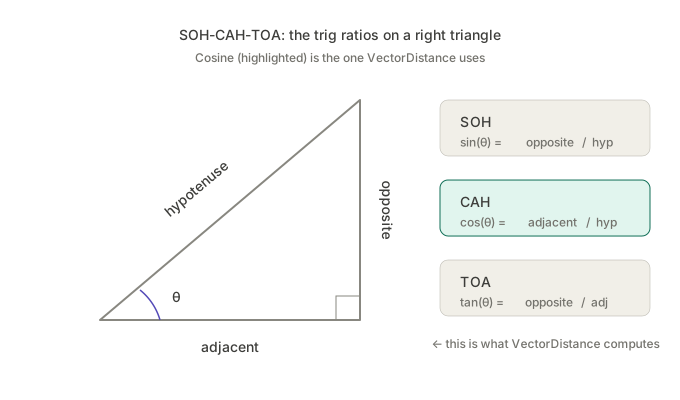
What we're doing with vector similarity is measuring the angle between two arrows.
Picture two arrows — vectors — both starting from the same point, pointing out into space. Each arrow represents a recipe's embedding. The direction the arrow points encodes the meaning — the flavor profile, the ingredient types, the character of the cocktail. The angle between the two arrows tells you how similar the meanings are.
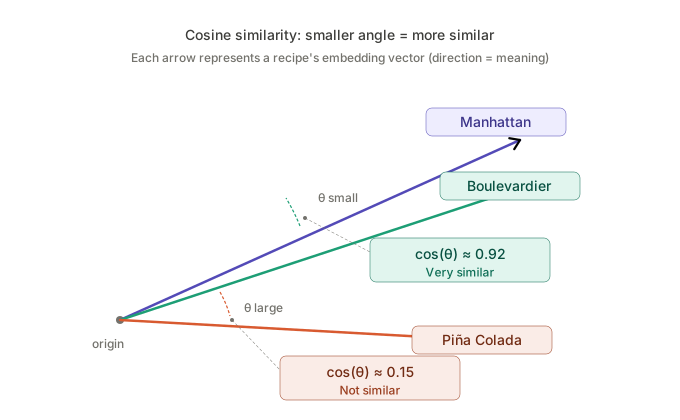
If two arrows point in exactly the same direction, the angle between them is 0°. The cosine of 0° is 1.0 — perfect similarity. If two arrows point in completely unrelated directions — 90° apart — the cosine of 90° is 0. No relationship.
That's it. That's the whole thing. All of this AI-powered semantic search magic is — at its core — the cosine function from high school trigonometry. Cosine is adjacent over hypotenuse. The cosine of the angle between two arrows in 1,536-dimensional space.
BTW, that "θ" in the "cos(θ)" — that's the Greek letter "theta". Theta refers to the value of the angle that we're referring to.
The reason cosine works so well for text embeddings is that it only cares about direction, not length. Two recipe vectors might have different magnitudes for reasons that don't mean anything semantically — maybe one recipe had a longer description, maybe one had more ingredients. Cosine ignores all of that and just asks: are these arrows pointing the same way?
In practice, when you see a similarity score of 0.92, that means the two arrows are nearly parallel — the recipes have very similar flavor DNA. A score of 0.45 means they're kind of related but pointing in noticeably different directions. A score near 0 means they have essentially nothing in common.
And you never have to compute any of this yourself. VectorDistance does it. But knowing what it's actually doing — comparing the angle between two directions in high-dimensional space using a function you learned in 10th grade — makes the whole system a lot more understandable while still preserving the pure, amazing magic of the calculation.
Triangle math stuff from geometry helps me to compare cocktail recipe similarity. I never saw that coming.
The Projection Problem (And the Fix)
In the earlier version of this code, this query bypassed the Benday.CosmosDb library's diagnostics entirely. The reason was purely mechanical: the library's GetResultsAsync methods were generic on the repository's entity type — CocktailRecipe — but this query projects to a different shape. It returns a SimilarityRow that has a Score field instead of an Embedding field.
The types didn't match, so the query had to use container.GetItemQueryIterator<SimilarityRow>() directly, which meant the ICosmosQueryLogSink never saw it. Chapter 11 made a whole point about knowing what runs — and here was a query running in the dark.
The fix was adding a GetResultsAsync<TResult>(QueryDefinition, ...) overload to the library that's generic on the row type rather than locked to the repository's entity type. Same diagnostics pipeline, different deserialization target:
var rows = await GetResultsAsync<SimilarityRow>(
    definition, GetQueryDescription(), pk);

return rows.Select(row => new RecipeSimilarityResult
{
    Recipe = new CocktailRecipe
    {
        Id = row.Id.SafeToString(),
        Name = row.Name.SafeToString(),
        Description = row.Description.SafeToString(),
        Ingredients = row.Ingredients ?? new()
        // ... other fields
    },
    Score = row.Score
}).ToList();
Now the sink sees the SQL text, the RU charge, and the duration. And those numbers are worth seeing.
What Vector Search Costs
From the query log sink — a real session browsing around the cocktail app:
| Query | RUs | Duration | Results |
|---|---|---|---|
| Title search ("manhattan") | 11.34 | 379ms | 17 |
| Single ingredient ("rye") LINQ | 201.09 | 2,686ms | 687 |
| Multi-ingredient ("rum" + "bourbon") | 28.29 | 246ms | 49 |
| Vector similarity (TOP 8) | 430.95 | 641ms | 8 |
Vector search is expensive per query — about 431 RUs to find the 8 nearest neighbors out of 5,823 recipes. That's the cost of computing VectorDistance across every embedded document in the partition. It's consistent too — across seven GetSimilarAsync calls in the same session, the charge was between 419 and 431 RUs every time.
But here's the context. A vector search runs maybe once per user action — "show me similar recipes" or "search by description." It's not running in a loop. A title search or ingredient search might run on every keystroke if you have autocomplete wired up, but a vector search runs when the user clicks a button. At that frequency, 431 RUs is completely manageable.
The "heat death of the universe" framing from Chapter 11 applies here too. If you're running vector queries millions of times a day, the RU cost matters and you'd want to look at DiskANN tuning, result caching, or reducing the dimension count. For the cocktail app's scale — a few thousand users a day, maybe a few hundred vector queries — 431 RUs is pocket change.
Three Ways to Search
The same GetSimilarAsync method powers all three search modes. The only difference is where the query vector comes from.
Similarity Search: "Find Recipes Like This One"
The user is looking at a recipe — say, a Manhattan — and wants to find similar cocktails. The query vector is the Manhattan's own embedding, already stored on the document:
// Look up the source recipe
var source = await repo.GetByNameAsync("Manhattan");

// Use its embedding as the query vector
var results = await repo.GetSimilarAsync(
    source.Embedding,
    limit: 8,
    excludeRecipeId: source.Id);
The results share flavor DNA without any keyword overlap. A Manhattan (rye, sweet vermouth, bitters) returns things like the Boulevardier (bourbon, sweet vermouth, Campari) and the Rob Roy (Scotch, sweet vermouth, bitters). The embedding model understands that these are structurally similar cocktails even though the specific spirits are different — because the embedding text included the taxonomy categories, and "Whiskey (Old Overholt Rye)" and "Whiskey (Famous Grouse Scotch)" are nearby in embedding space.
Natural Language Search: "Something Dark and Smoky"
This is the one that I'm really looking forward to adding to a talk and demoing at a conference. I think this'll be a wow moment. (Or maybe it won't and I'm just a complete and total nerd.) The user types a free-text description of what they're in the mood for. We embed that text and use the resulting vector as the query:
// Embed the user's description
var queryVector = await embeddingService.GetEmbeddingAsync(
    "something dark and smoky with mezcal");

// Search by semantic similarity
var results = await repo.GetSimilarAsync(queryVector, limit: 8);
"Something dark and smoky with mezcal" has zero keyword overlap with any recipe in the database. But the embedding model places it near recipes that contain mezcal, mole bitters, coffee liqueur, dark spirits — the conceptual neighborhood of "dark and smoky." The search works not because of text matching but because of meaning matching.
The cost is one additional embedding call — the user's query text gets sent to Azure OpenAI, which returns a vector, and then that vector goes into the same VectorDistance query. The embedding call takes about 100–200ms and costs a fraction of a cent.
Opposites Shouldn't Attract But Do Anyway
There is one downside to the way it's currently written. If I say "I'd like something dark and smoky without Cynar or Fernet," it returns me a whole bunch of recipes that contain Cynar and Fernet Branca. (I like flavors that are "herbal" but I don't particularly care for "bitter.")
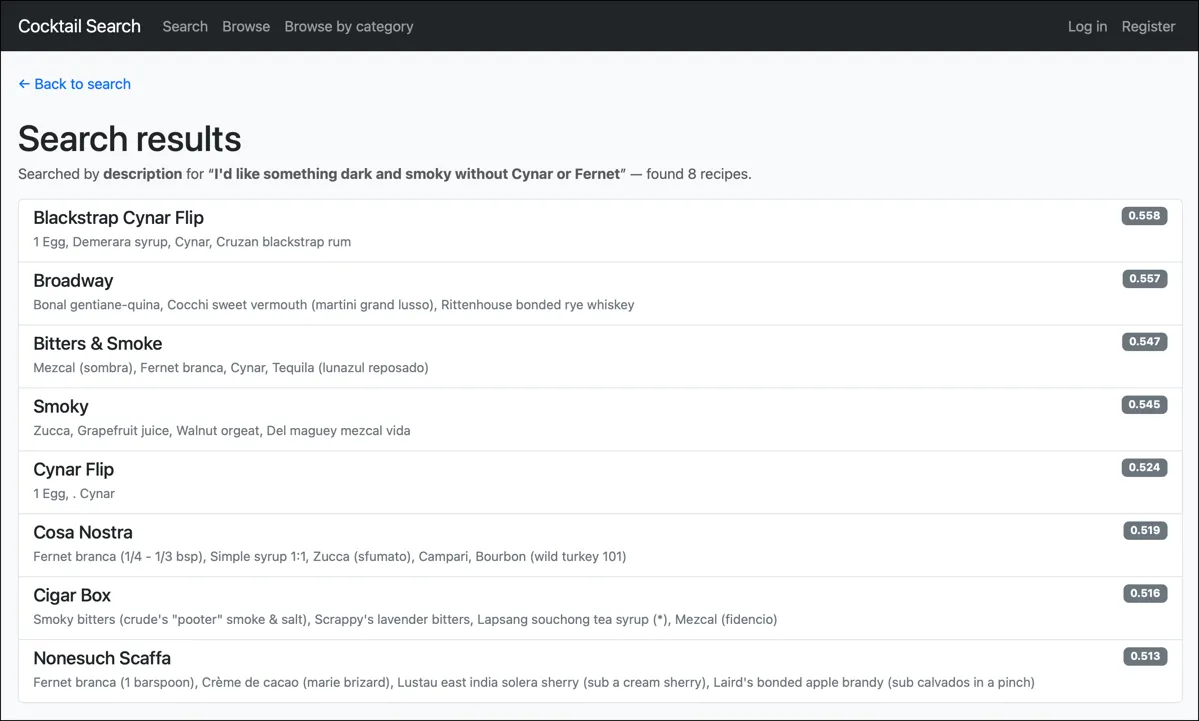
The issue is that embedding models capture what the text is about, not the logical intent behind it. "Something dark and smoky with Cynar" and "something dark and smoky without Cynar" produce nearly identical embeddings — because both texts are about Cynar. The model sees "dark," "smoky," "Cynar," and "Fernet" as the meaningful content words and places the query vector right next to recipes containing those ingredients. The word "without" barely moves the needle.
We started out this chapter by trying to pin down an abstraction for meaning. Perhaps we should have been saying about instead — "what is this text about?" versus "what does this text mean?" The model that we're using (an embedding model) tends to see that "without Cynar or Fernet" part of the query as something that should attract results that contain rather than don't contain those ingredients. It's because those words generate more relative similarity rather than less.
This is a known limitation of pure vector search, and it's why applications often using a hybrid search model. In that hybrid search model, you actually do something more like two queries rather than just one. The positive part of the query — "dark and smoky, herbal" — is a great fit for vector similarity. The negative part — "not Cynar, not Fernet" — is a great fit for a traditional keyword exclusion filter. Combining the two, you'd embed the positive description for the VectorDistance ranking and add NOT EXISTS or NOT CONTAINS clauses to the WHERE to filter out the ingredients you don't want. The vector finds the neighborhood; the filter trims the results.
I haven't built that combined mode yet, but the plumbing is all there — it'd just be another WHERE clause on the same query or a filter in-memory on the results.
Hybrid Search: Filter Then Rank
The third mode combines a traditional filter with vector similarity. "Show me gin cocktails similar to a Manhattan." The gin part is a keyword filter; the similar-to-Manhattan part is a vector search.
This can be done by adding filter clauses to the VectorDistance query's WHERE — AND EXISTS(SELECT VALUE i FROM i IN c.ingredients WHERE CONTAINS(i.name, 'gin', true)) before the ORDER BY. You get the precision of keyword filtering with the intelligence of semantic ranking.
What You Now Know
The cocktail app now has four search modes: title, single ingredient, multi-ingredient, and natural language. The first three are keyword searches — they match text. The fourth matches meaning. All four use the same Cosmos container, the same partition layout, and the same ICosmosQueryLogSink diagnostics pipeline.
Vector search in Cosmos isn't a separate product or a separate database. It's a property on your document, a policy on your container, and a SQL function in your query. The embedding model — text-embedding-3-small — does the hard work of turning text into vectors. What you feed it matters more than any other decision in the pipeline. The taxonomy Secondary categories in the cocktail app are what make the embeddings smart enough to know that Punt e Mes and Sweet Vermouth are the same kind of thing.
The cost model is two-layered: a one-time batch cost to embed your corpus (negligible), and an ongoing per-query cost to search it (~431 RUs for TOP 8 across 5,823 recipes). Both are manageable at the scale most apps operate at.
One thing that came up during development: the vector search query originally bypassed the library's diagnostics because it projected to a different row type than the repository's entity type. That bugged me. I added a GetResultsAsync<TResult> overload so projected queries go through the same sink as everything else. The Chapter 11 principle — know what runs — applies to vector queries just as much as to LINQ.
Next up: Chapter 13, where we address the biggest criticism people throw at Cosmos DB — "you can't do reporting." Spoiler: the criticism is aimed at the wrong target. The cocktail app's data mirrors into Fabric with zero lines of ETL code, and suddenly you've got Power BI dashboards over the same recipe data you've been searching all along.