This is Part 1 of the Mocking with Moq series, the companion to my VSLive 2026 "Mocking with Moq" session.
← Previous: Start here: What Is Moq, and Why Would I Mock Anything?
Shameless plug: Honest Cheetah answers "are we on track?" for free, straight from your Azure DevOps or GitHub data, with forecasting from your real throughput. It measures the system, not the people.
▶ Watch this video on YouTube (opens in a new tab)
Here's the scenario: you just inherited an app. It works, but it has zero unit tests, and you're being asked to do some work on it. Add features, add unit tests, squash some bugs.
Somebody else wrote it, and they did an okay job. But no unit tests means nobody planned for testability. There's no dependency injection, and some of the logic is a little bit jumbled. It's EF Core against SQL Server, so "testing" it means deploying the schema and running the app.
So how do you unit test code that calls the database? The answer comes in parts, and this first part has no Moq in it at all. That's on purpose. Before we can mock anything, we need to do a little refactoring.
TL;DR
- The first unit test on legacy code usually doesn't need a mock. It needs a smaller class.
PersonManagerdoes two jobs in one method: it gets the data ready to save (copying fields fromPersontoPersonEntity), and it actually saves it. You can't test the copying without also hitting the database.- Pull the copy-the-fields logic out into its own class,
PersonToEntityAdapter. It's pure logic with no dependencies, so its tests use real objects. - Write the tests first, watch them fail, then make them pass.
- Go back to
PersonManager, use the adapter in both directions, and delete the dead code. - What's left in
PersonManageris the part that talks to SQL Server. That's the part Moq is for, and it's coming up.
The App We're Inheriting
The app is pretty darn basic. It just saves and loads person records. Since this is the first demo in the series, you get the tour. The rest of the series jumps straight into the code.
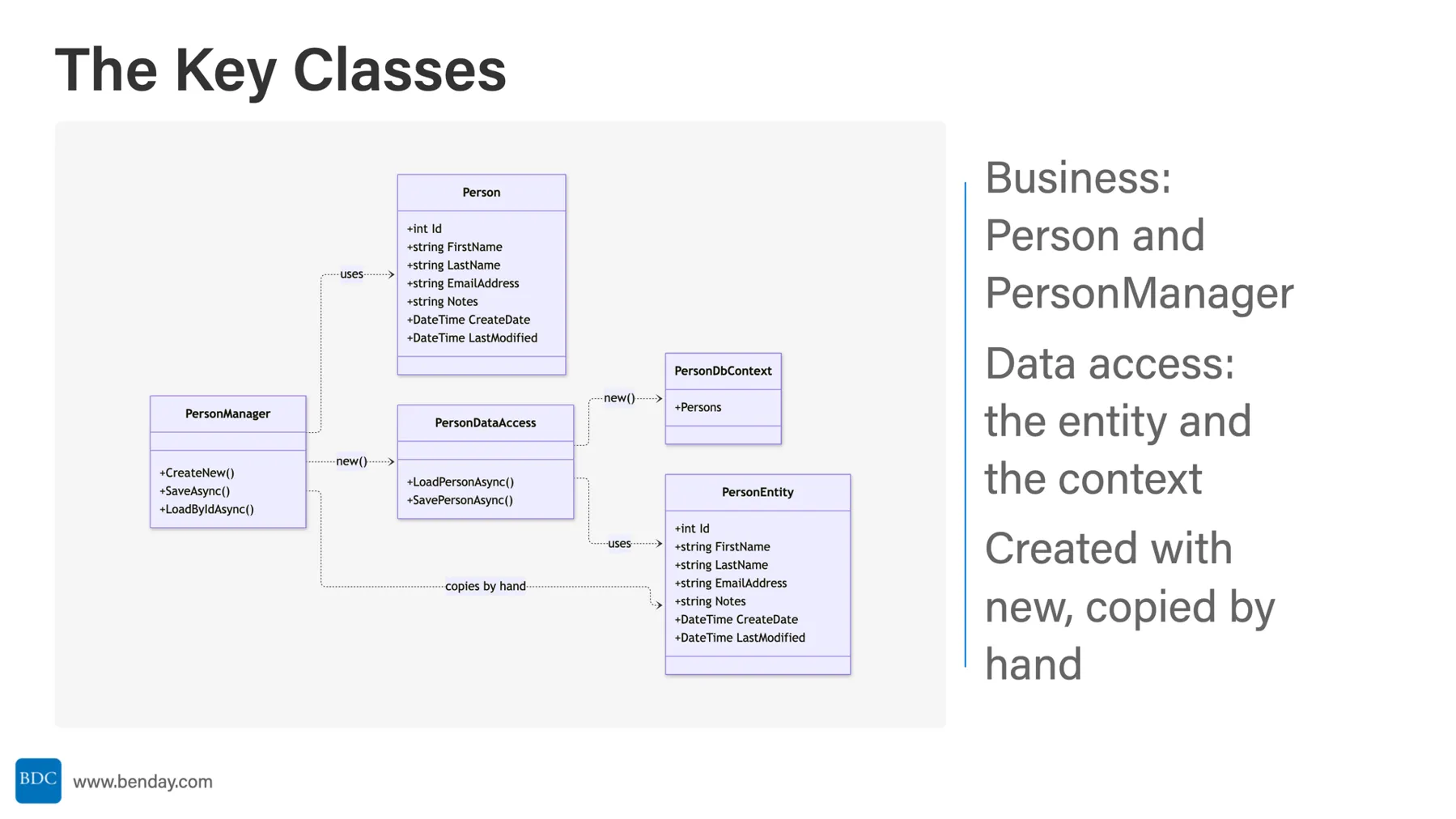
On the business side, Person is just the fields, and PersonManager creates, saves and loads those. On the data access side, PersonEntity is the EF Core entity with the exact same fields as Person, and PersonDataAccess talks to the database through PersonDbContext.
PersonManager is a coordinator class. You'll often hear that called a service layer, or maybe a facade. It's the main entry point for operations against the Person class: basically save, create new, and load.
I'll say this for the original coder: they did a pretty good job of hiding Entity Framework Core away from the rest of the app, and I think that is such a good idea. The rest of the app works with Person. Only the data access project knows about PersonEntity.
The place where we're going to focus is the two dotted lines coming out of PersonManager in that diagram. It constructs its own instances of PersonDataAccess with new, and it copies Person to PersonEntity by hand.
What Happens on Save
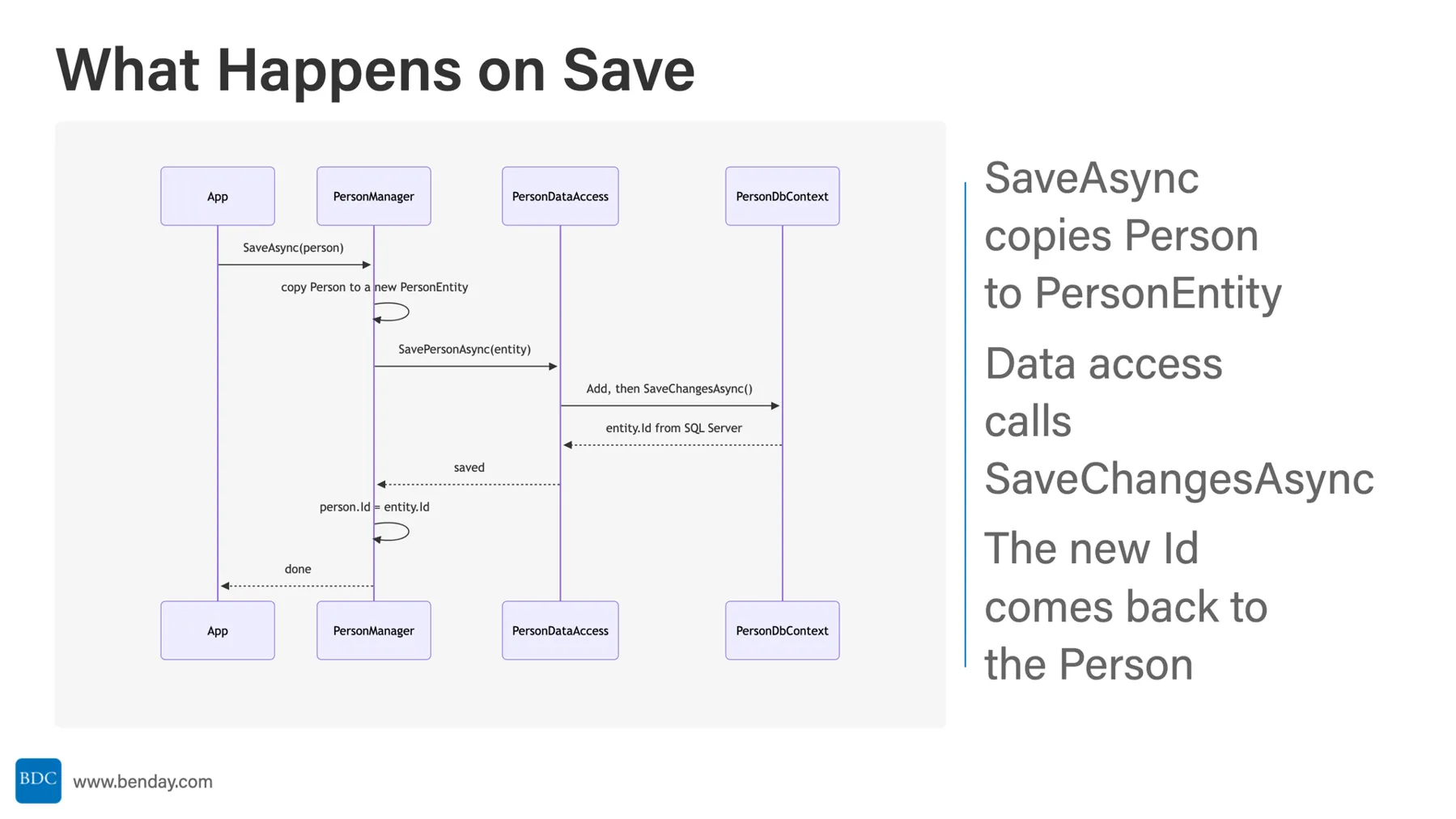
A save comes in to SaveAsync. It looks at the Id on the person. If it's zero, it hasn't been saved yet, so off we go to SaveNewAsync. Here's that method as we inherited it, comments and all:
private async Task SaveNewAsync(Person saveThis)
{
    // Problem: PersonManager creates its own data access, so every call goes to
    // SQL Server and a test has no way to substitute anything.
    var dataAccess = new PersonDataAccess();

    // Problem: the real clock. A test can't know what time this will be.
    saveThis.CreateDate = DateTime.UtcNow;
    saveThis.LastModified = DateTime.UtcNow;

    var entity = new PersonEntity();
    CopyToEntity(saveThis, entity);

    await dataAccess.SavePersonAsync(entity);

    saveThis.Id = entity.Id;
}
It creates an instance of PersonDataAccess. It stamps the create date and last modified date. It creates a PersonEntity, which is the thing EF Core is actually going to load and save, and copies the values onto it. Then it calls SavePersonAsync, and when that comes back, it grabs the ID value that SQL Server generated and puts it back on the Person.
SavePersonAsync over in data access isn't doing anything particularly interesting or crazy. It wraps the creation of the DbContext, decides between an add and an update, and calls SaveChangesAsync. That's when the record lands in SQL Server.
Where the Bugs Happen
One of the first things we're being asked to fix is to tighten up making sure that the right values from the Person object make it to the right columns in the database. That logic lives in CopyToEntity:
// Problem: hand-copying fields between the two shapes, here and again in
// LoadByIdAsync. Miss a field and the data is silently lost.
private static void CopyToEntity(Person fromValue, PersonEntity toValue)
{
    toValue.FirstName = fromValue.FirstName;
    toValue.LastName = fromValue.LastName;
    toValue.EmailAddress = fromValue.EmailAddress;
    toValue.Notes = fromValue.Notes;
    toValue.CreateDate = fromValue.CreateDate;
    toValue.LastModified = fromValue.LastModified;
}
In this case, it's pretty simple code. I'm sure you've written code like this a zillion times.
But when it's not so simple, this is a really great place to completely mess something up. You miss a field, and the data is silently lost. You fat finger one of the assignment statements, and the wrong value goes into the wrong field. This is where the bugs happen.
And it isn't in just one place. SaveNewAsync and SaveExistingAsync both call CopyToEntity, and LoadByIdAsync does the same copying in the other direction with a hand-built new Person { ... }.
Two Jobs in One Method
This code doesn't look super bad or anything. But it's violating a recommended pattern called the Single Responsibility Principle, also known as SRP. The short form: a class should do one thing, and one thing only, and do it well.
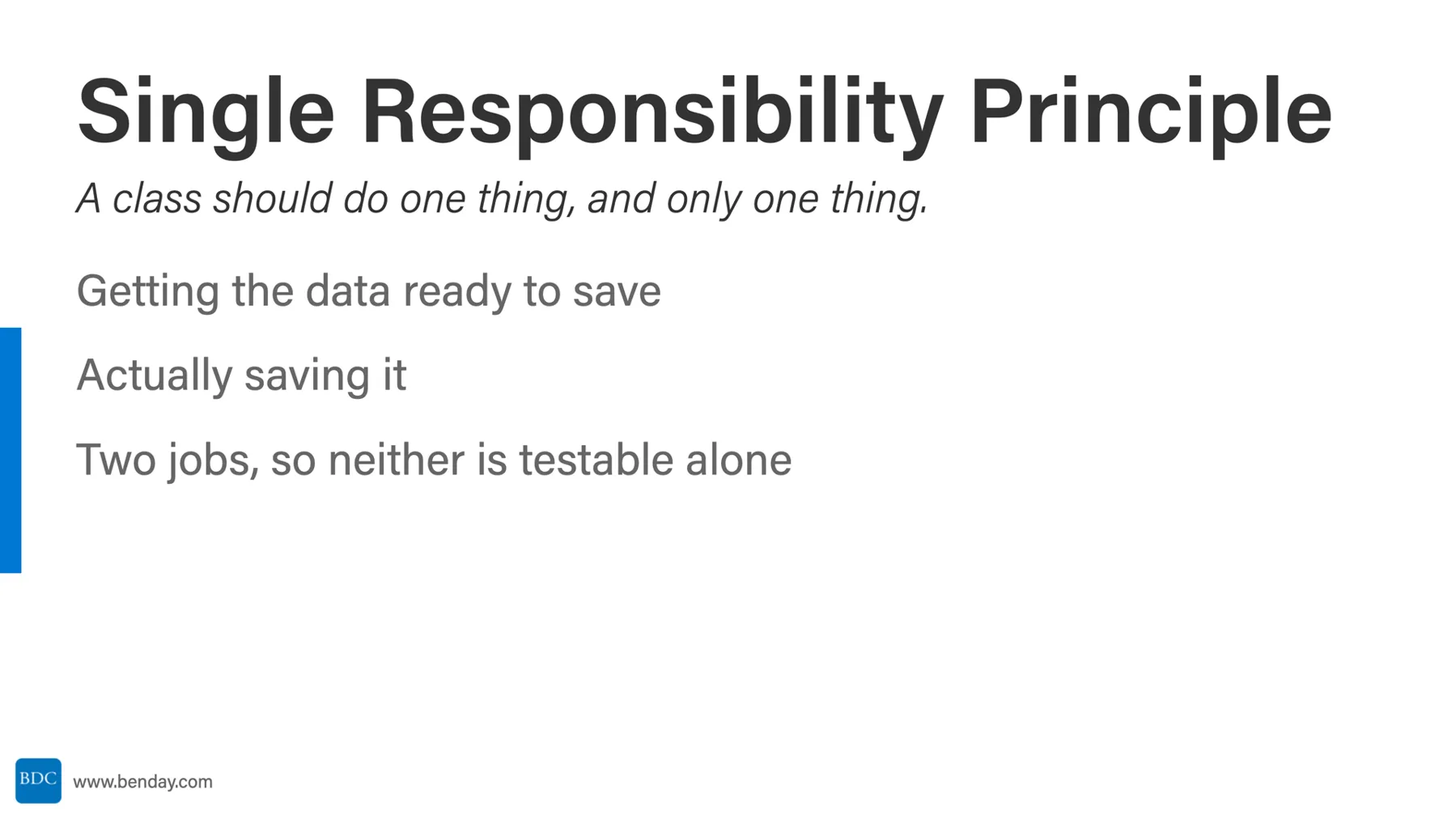
There are at least two things happening in SaveNewAsync:
- Getting the data ready to be saved. Stamping the dates and copying the
Personover to the entity. - Actually saving it. That call down into data access.
I think of those as adapt logic and repository logic. Once again, the code isn't terrible, but it's definitely a problem for testing, because you can't test the copying without also hitting the database.
So who should own the copying? PersonManager is a coordinator class. So what it should be doing is, well, coordinating. It should be making calls to other classes and delegating the work off to them. Copying all those values really isn't core to the mission of PersonManager.
That's the first thing we're going to split. We're pulling the CopyToEntity stuff out.
Extract the Adapter Class
In the business project, add a new class called PersonToEntityAdapter and make it public.
In order to make this not a super boring, tedious demo, I used one of my base classes from my Benday.EfCore NuGet package: AdapterBase. It helps you with this adapt logic, and it takes a couple of generic types. The first one is the model type, Person. The second one is the entity type, PersonEntity.
At that point Visual Studio complains that there are abstract methods to implement. Let it implement the abstract class, and you get two PerformAdapt methods, one for going from person to entity and one for entity to person, each throwing a NotImplementedException.
Leave them like that for a minute. We're writing the test first.
Set Up the First Unit Test
In the unit test project, add a class called PersonToEntityAdapterFixture. Here's the top of it, with the first test:
public class PersonToEntityAdapterFixture(ITestOutputHelper output) : TestClassBase(output)
{
    private PersonToEntityAdapter SystemUnderTest => field ??= new PersonToEntityAdapter();

    // Every field should land on the entity.
    [Fact]
    public void Adapt_FromPersonToEntity_CopiesTheFields()
    {
        // arrange
        var fromValue = FakeValueGenerator.Create<Person>();
        var toValue = new PersonEntity();

        // act
        SystemUnderTest.Adapt(fromValue, toValue);

        // assert
        toValue.FirstName.ShouldEqual(fromValue.FirstName, "FirstName should be copied");
        toValue.LastName.ShouldEqual(fromValue.LastName, "LastName should be copied");
        toValue.EmailAddress.ShouldEqual(fromValue.EmailAddress, "EmailAddress should be copied");
        toValue.Notes.ShouldEqual(fromValue.Notes, "Notes should be copied");
        toValue.CreateDate.ShouldEqual(fromValue.CreateDate, "CreateDate should be copied");
        toValue.LastModified.ShouldEqual(fromValue.LastModified, "LastModified should be copied");
    }

    // ...
}
A few things about the shape of this, because you can reuse it:
TestClassBaseis in my Benday.Common.Testing library. It gives us some nice little wrapper stuff for working with xUnit. One of the things it helps with is logging to the console: the fixture grabsITestOutputHelper, which comes to us from xUnit, and passes it into the base class.SystemUnderTestis a property that creates the adapter if it's null and hands back the same one after that. Every test in the fixture goes through it.FakeValueGenerator.Create<Person>()fills in the source object with predictable values. So if a field doesn't get copied, the assert for that field fails and tells you which one.- Arrange, act, assert. Fill a source object, call
Adaptto go from the from value to the to value, then check the values on the to value.
(In the video I typed this out the longer way, with an explicit constructor and a _systemUnderTest backing field. The version in the demo repo, shown here, uses a primary constructor and the field keyword. Same idea.)
A Quick Detour: EditorConfig
This part has nothing to do with unit testing. While I was typing that backing field, Visual Studio gave me an error about variable naming. It didn't like my naming convention. And you know what, I wasn't sure I liked what it was configured as either.
So I popped down to the command line and looked in the solution directory for an .editorconfig file. There wasn't one. So:
dotnet new editorconfig
That file describes the default naming conventions from the .NET world, and it overrides whatever weird thing I've got in my Visual Studio settings. It helps enforce some code quality stuff while you refactor, and it made that error go away. Detour over.
Run the Tests and Watch Them Fail
There are three tests in the fixture. I pasted the other two in, because it would be boring to watch me type:
Adapt_FromPersonToEntity_CopiesTheFields: going towards the database, every field lands on the entity.Adapt_FromPersonToEntity_DoesNotCopyTheId: also going towards the database, and making sure it doesn't mess up the database ID.Adapt_FromEntityToPerson_CopiesTheFieldsAndTheId: the other direction, from the database towards the app. Basically the same thing in reverse, and this time the ID does come along.
The ID test is short enough to show:
// The database owns the entity's Id, so the adapter must leave it alone.
[Fact]
public void Adapt_FromPersonToEntity_DoesNotCopyTheId()
{
    // arrange
    var fromValue = FakeValueGenerator.Create<Person>();
    var toValue = new PersonEntity { Id = 42 };

    // act
    SystemUnderTest.Adapt(fromValue, toValue);

    // assert
    toValue.Id.ShouldEqual(42, "The database owns the entity's Id");
}
First build, I got a little problem: test classes must be public. Visual Studio had created mine as internal. Change it to public, build again, and the three tests show up in Test Explorer.
Run them, and they all fail.
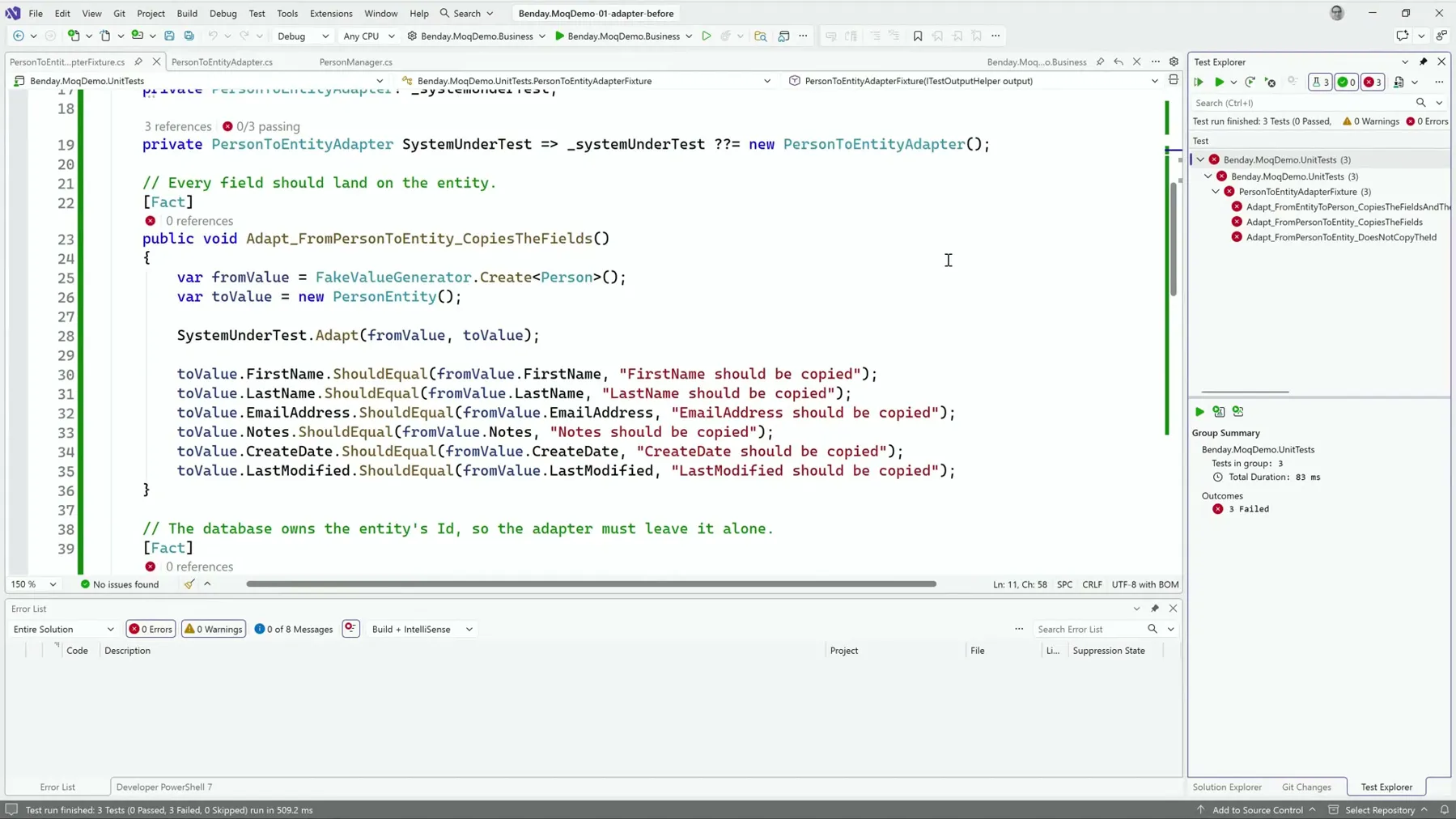
Three tests, three failures. Which is to be expected, because there's no implementation yet.
They fail with a NotImplementedException, which is exactly what those generated PerformAdapt methods throw. That's a good red. The tests run, they reach the adapter, and they fail for the reason I expect.
It's not particularly hard code. But, once again, this is where a lot of bugs actually show up in our applications.
Implement the Adapter
Now make them pass:
public class PersonToEntityAdapter : AdapterBase<Person, PersonEntity>
{
    // The database owns PersonEntity.Id, so it is never copied onto the entity.
    protected override void PerformAdapt(Person fromValue, PersonEntity toValue)
    {
        toValue.FirstName = fromValue.FirstName;
        toValue.LastName = fromValue.LastName;
        toValue.EmailAddress = fromValue.EmailAddress;
        toValue.Notes = fromValue.Notes;
        toValue.CreateDate = fromValue.CreateDate;
        toValue.LastModified = fromValue.LastModified;
    }

    protected override void PerformAdapt(PersonEntity fromValue, Person toValue)
    {
        toValue.Id = fromValue.Id;
        toValue.FirstName = fromValue.FirstName;
        toValue.LastName = fromValue.LastName;
        toValue.EmailAddress = fromValue.EmailAddress;
        toValue.Notes = fromValue.Notes;
        toValue.CreateDate = fromValue.CreateDate;
        toValue.LastModified = fromValue.LastModified;
    }
}
Nothing particularly crazy here. Going from person to entity, copy the fields. Going the other direction, copy the fields and grab that ID value.
Run the tests again.
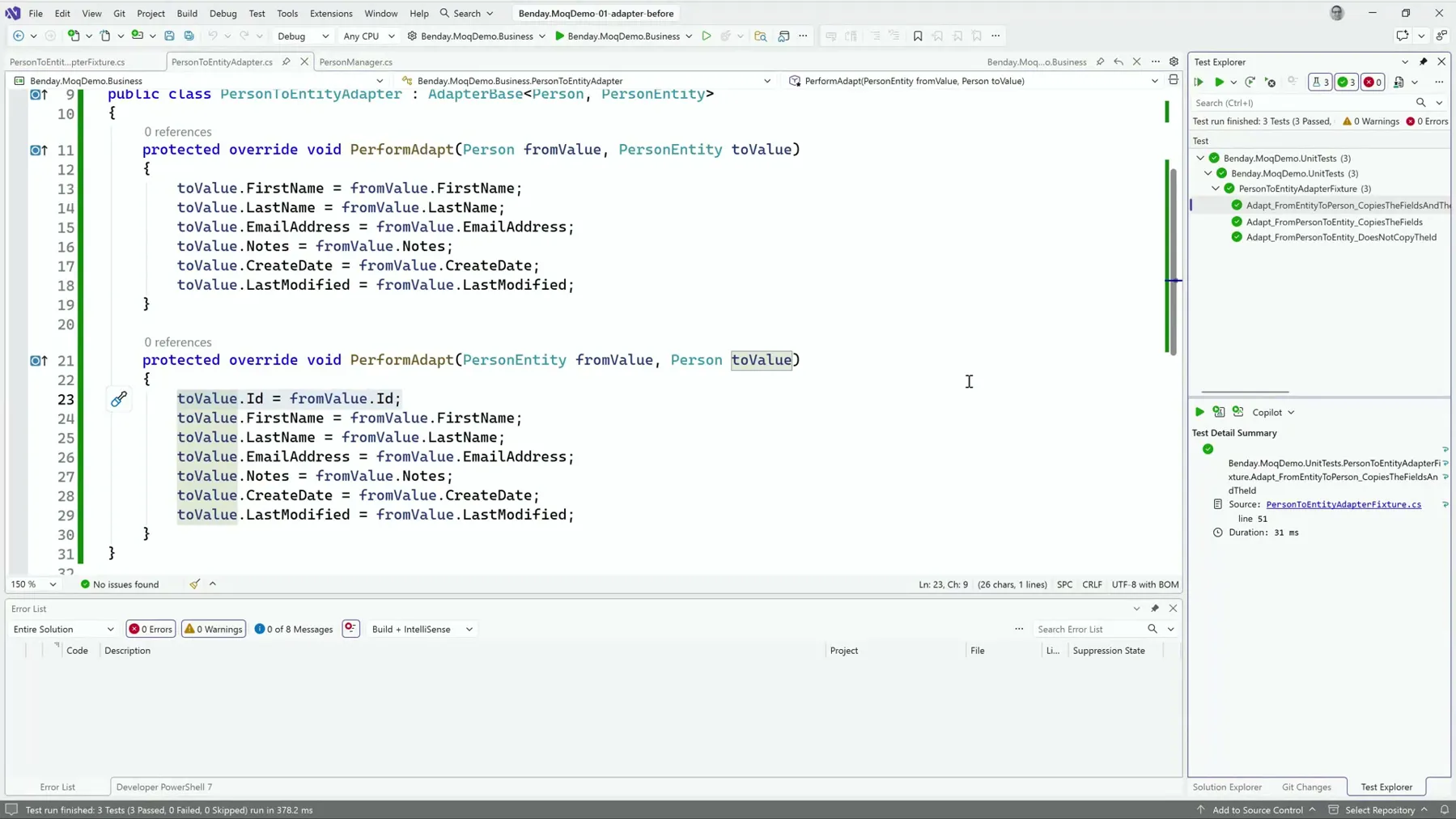
Same three tests, now green.
Notice what we didn't need: no SQL Server, no connection string, no mocking framework. The unit test project in this demo doesn't even reference Moq yet.
Use the Adapter in PersonManager
Now go back to PersonManager and rip the old stuff out. Here's SaveNewAsync after the change:
// Created with new, not injected: the adapter is pure logic, so tests use the
// real one. A mocked adapter would silently copy nothing.
private readonly PersonToEntityAdapter _adapter = new();

// ...

private async Task SaveNewAsync(Person saveThis)
{
    // ...
    var entity = new PersonEntity();
    _adapter.Adapt(saveThis, entity);

    await dataAccess.SavePersonAsync(entity);

    saveThis.Id = entity.Id;
}
SaveExistingAsync gets the same one-line swap. At that point nothing calls CopyToEntity anymore. It's dead code. We don't need it, so get rid of it.
Then do the same thing in reverse in LoadByIdAsync, where the hand-built Person used to be:
var person = new Person();
_adapter.Adapt(entity, person);

return person;
(In the video I created the adapter as a local variable in each method with var adapter = new PersonToEntityAdapter();. The finished code in the repo holds one in a field, which is what's shown here.)
One thing in that code comment is worth saying out loud, given the name of this series. The adapter is created with new. It is not injected, and it should not be mocked. It's pure logic with no dependencies, so tests should use the real one. A mocked adapter would silently copy nothing, and the copying is the whole thing we care about.
Recap
- We started with a
PersonManagerthat was copying data and saving data in the same method. That's a single responsibility problem, and it meant you couldn't test the copying without a database. - We pulled the copy logic out into its own class,
PersonToEntityAdapter. - We wrote the unit tests for it first, watched them fail, and then implemented the adapter until they passed.
- We went back into
PersonManager, swapped in the adapter in both directions, and deleted the dead code. - No Moq. The first refactoring didn't need it.
PersonManager still creates its own data access, its own logger, and reads the real clock. So there's still a hard dependency on SQL Server sitting in there.
Next up: what to change to make that code mockable, and then putting the database behind a repository interface. That's where Moq finally shows up.
Shameless Plug
I built a tool called Honest Cheetah that answers "what are we working on?", "what's stuck?" and "are we on track?" straight from your Azure DevOps or GitHub data. It's free. Give it a try and let me know what you think.
-Ben
-- Looking for help getting an untested codebase under test, or with unit testing and architecture on your .NET team? We can help. Drop us a line at info@benday.com.
Mocking with Moq: The Full Series
- Start here: What Is Moq, and Why Would I Mock Anything?
- Part 1: How Do I Unit Test Code That Calls the Database? Untangle It First (you are here)
- Part 2: How Do I Make My Code Mockable?
- Part 3: How Do I Unit Test Code That Calls the Database? Mock the Repository
More coming soon.
Related:
- Demo code on GitHub: before and after for every episode
- The Mocking with Moq playlist on YouTube
- Moq on GitHub
- Benday.Common.Testing on NuGet
- Benday.EfCore on GitHub