This is Part 2 of 4 in the GitHub Projects in 2026 series.
← Previous: Part 1: It Can Do Anything. That's the Problem. · Next: Part 3: Your First Project, From Draft Issues to Real Issues →
Shameless plug: Already running your team in GitHub Projects? Honest Cheetah adds test management and "when will it be done?" forecasting right inside GitHub, using the data you already have. It measures the system, not the people.
▶ Watch this video on YouTube (opens in a new tab)
If you've spent any time in GitHub, you've probably noticed that GitHub Projects and GitHub Issues are two different things. Issues live in one place. Projects live somewhere else. An issue can be in a project, or in two projects, or in no project at all. And the first time you hit that, it feels a little weird.
There's a reason for it. The split between Projects and Issues grew out of GitHub's own success, and once you see where it came from, the weirdness turns into a pretty elegant design. That's what this post is about.
TL;DR
- GitHub started with Git, Git is all about repositories, and every issue lives inside a repo. I call this the tyranny of the repo.
- Real delivery work spans a bunch of repos, and Issues only ever had two statuses: open or closed. That made the three questions hard to answer.
- GitHub Projects sits on top as a lens, not a container. The issues stay where they are and remain the source of truth. The project is just how you look at them.
- Pull requests, GitHub Actions, and merges connect your board to the actual work, so "what are we working on right now?" and "are we on track?" start answering themselves.
First, the Three Questions
Before I get into the Projects-versus-Issues divide, a super quick refresher from Part 1. I talked about the All-New Three Questions and how they're the foundation for everything you do in project management:
- What are we going to work on? That's your prioritized list.
- What are we working on right now? That's what's in progress and what's blocked.
- Are we on track? Are we actually finishing stuff, or are we just busy?
These three questions are at the core of pretty much any project management effort, whether it's software development, building a house, or running a restaurant kitchen. It's all about establishing and maintaining situational awareness. They're not a software thing and they're not a GitHub thing.
But since we're building software with GitHub, let's talk about that.
GitHub Started With Git
Let's build up a picture of how GitHub is put together, and we'll start at the very beginning.
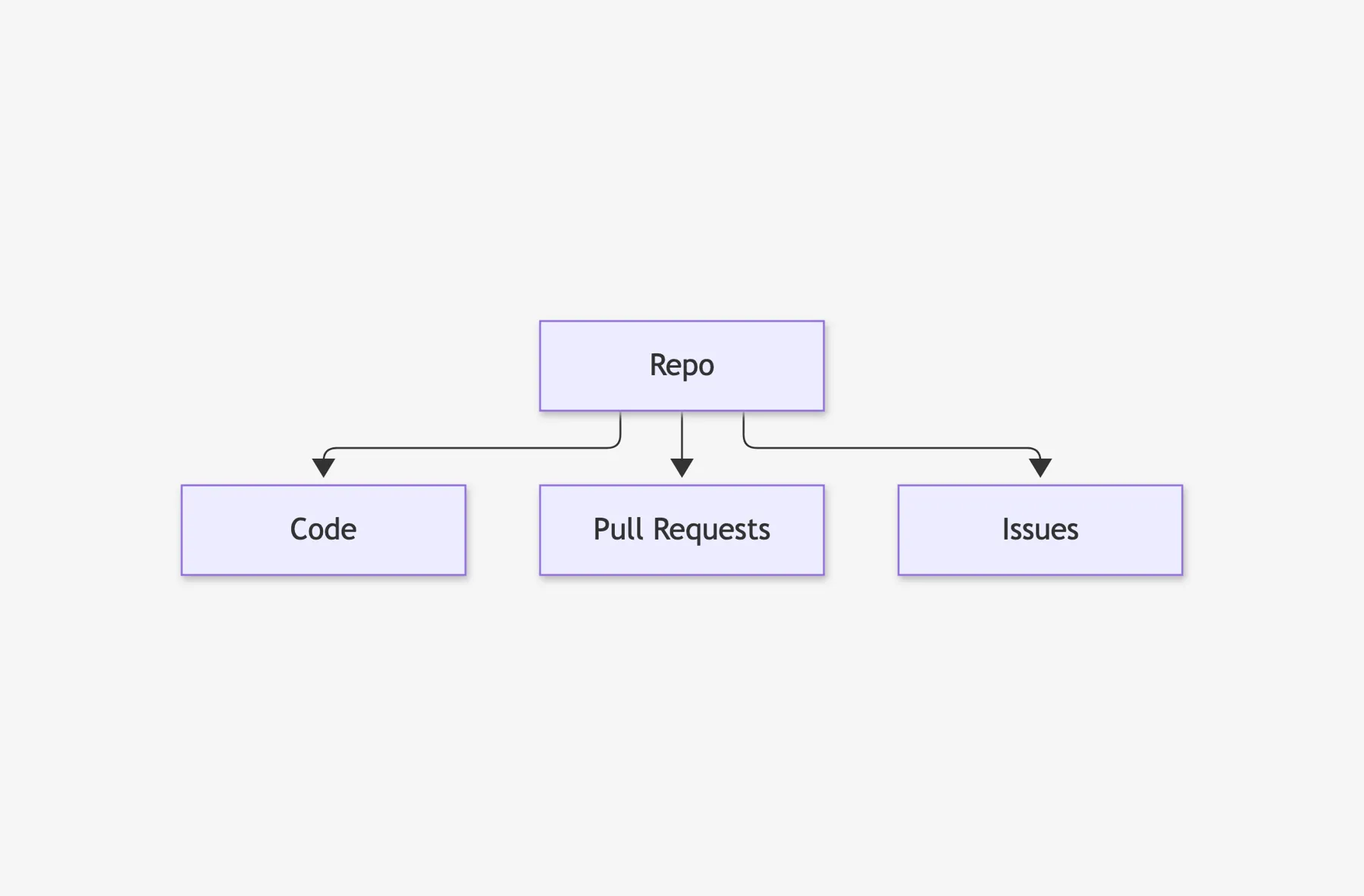
GitHub started with Git, and Git is all about repositories. Version control was at the core of GitHub, that version control flavor is Git, and in Git, everything lives in a repo.
So given that that's where GitHub got started, it's no surprise that GitHub's stuff tends to connect back to a repository. Your code, your branches, your pull requests, your settings. It all hangs off a repo. GitHub is repo-first.
Pretty early in GitHub's history, they added a lightweight work tracking system called GitHub Issues. And guess what? GitHub Issues live in a repo. Historically, Issues was more of a ticket system than a full-on project management system, but the key point to remember is this: every issue lives inside a repo.
For one repo with one team, that's totally fine. Hang on to it, though, because the repo being the center of the universe is going to keep coming up. I call it the tyranny of the repo.
Then GitHub Grew Up
But then GitHub grew up. Now it's an enterprise version control and DevOps delivery platform, and real delivery efforts don't always fit into just one repo.
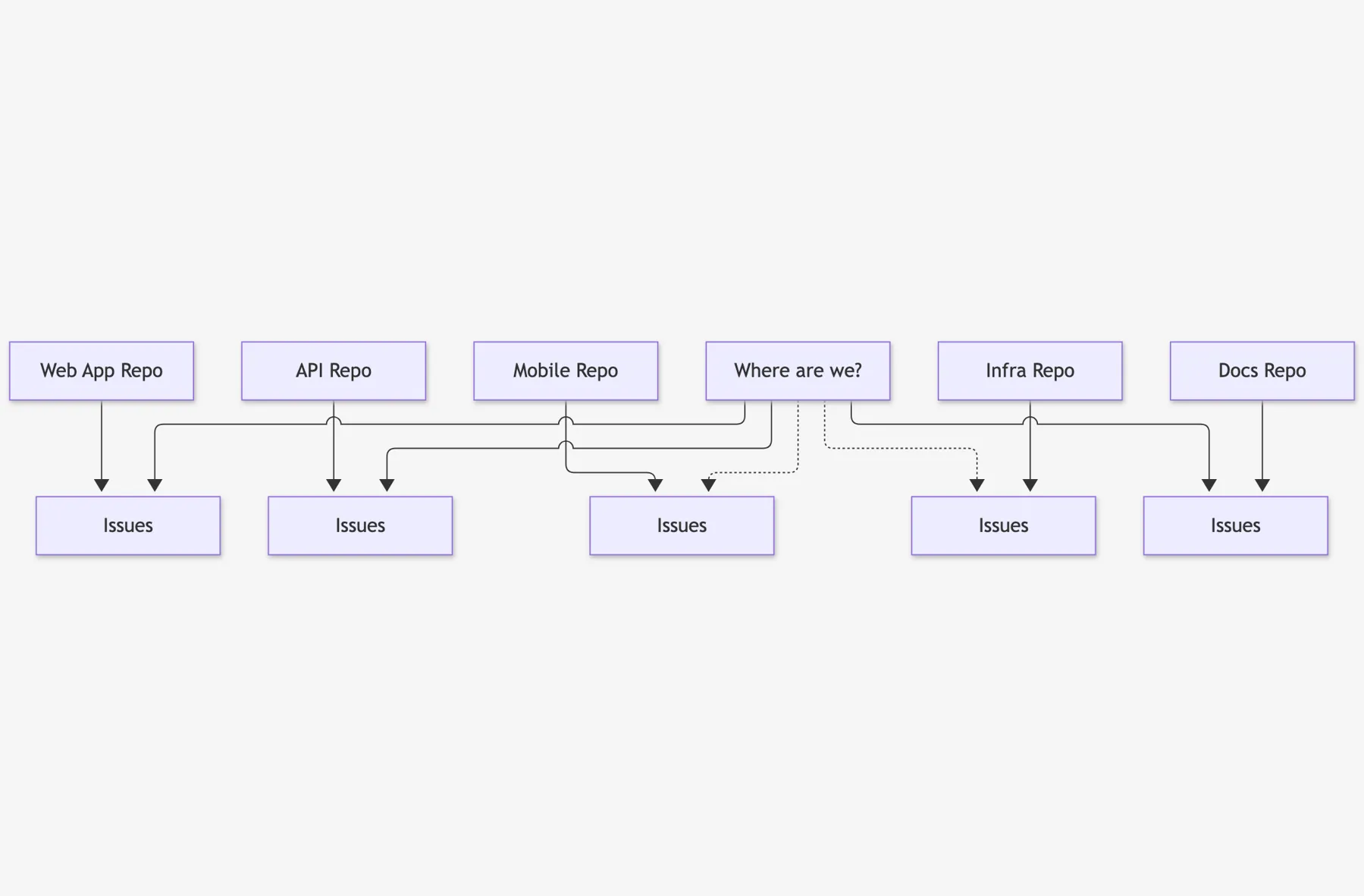
Let's say you're shipping one feature in a reasonably complex app. That feature might require changes in the web app, the API, and the mobile app. It's not crazy to think that's three separate repos.
Now think about how you'd track the work for that feature. If you create an issue, which repo does it go in? Do you create a duplicate issue in all of the repos, or just one? Or does it live in some other supporting repo that isn't related to code at all? It gets a little bit ugly.
Cross-repo work got hard to plan, hard to see, and really hard to forecast. You'd have to go hunting through five repos just to figure out where you are. Plus there's a non-zero chance that something ends up getting lost in a pile somewhere.
Issues: Open or Closed
There was another little problem with GitHub Issues, and it's status tracking.
This is a giant simplification, but in essence, issues in GitHub had only two statuses: open or closed.
I actually like that simplicity and clarity. But it just isn't how most teams need to work, because it's really hard to do multi-stage coordination with a boolean open/closed model. "In progress"? "Waiting on review"? "Blocked"? Nope. Open or closed.
Pretty Much the Opposite of the Three Questions
Put those two things together and getting answers to the three questions was getting awkward.
What are we going to work on? Well, it's spread across five repos.
What are we working on right now? That's spread across five repos, too.
Are we on track? It's tough to know without putting in actual effort.
You want situational awareness to be quick and easy, and the tyranny of the repo was making that hard.
The Azure DevOps Factor
There's one more piece of this story, and I want to be really clear up front: this is my guess. Nobody at Microsoft told me this.
Microsoft bought GitHub back in 2018, and over time, a lot of Azure DevOps talent moved over to work on GitHub.
In Azure DevOps, everything lives inside a team project. Repos, work items, pipelines, all of it. That model works, but it carries a lot of baggage, and moving stuff between team projects is genuinely painful. (If you've ever tried it, you're nodding right now.)
So my guess is that the people who lived with that model for years were in no hurry to rebuild it inside GitHub. And honestly? I don't blame them.
GitHub needed a way to plan across repos without building another giant container. And that's where Projects comes in.
Enter GitHub Projects
Ok. Let's put the picture back together, and this time, let's add Projects.
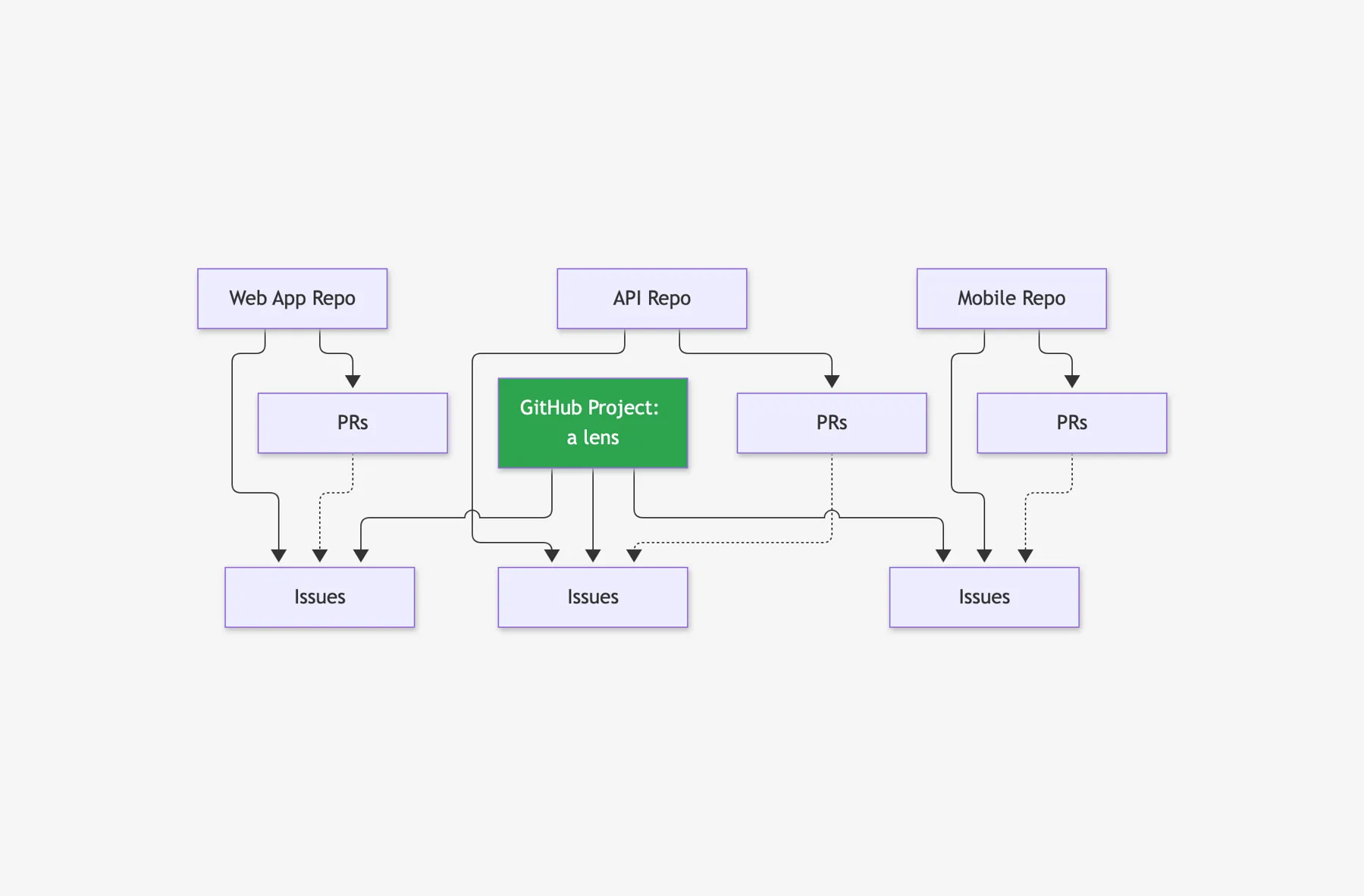
At the center of everything, you still have repos. That's where your code lives, and that's GitHub's core.
Inside those repos you have issues, and you have pull requests. Pull requests are how code gets reviewed and merged, and they can link back to issues.
And then a project sits on top, as a layer across all of those repos. It pulls issues from as many repos as you want into one place, where you can organize, filter, and track them.
Here's the key idea. A project is a lens, not a container. The issues still live in their repos, and the issues are the source of truth. The project is just how you look at them.
So that weirdness you felt? It's not a bug. It's a design. It's how GitHub works around the tyranny of the repo without throwing the repo away.
Why Not Just Pick One Repo for Everything?
Now I know what you're thinking. "Ok, Ben. So why not just pick one repo and put all the issues in there?"
Honestly, that's not a crazy idea. It's actually pretty close to what I'm going to suggest when we build our first project. But the code still lives in a bunch of repos, and the pull requests live where the code lives. So hold that thought. We'll come back to it in Part 3.
How It Fits With the Rest of GitHub
Back in Part 1, I promised we'd talk about how to connect project management to development, delivery, and DevOps. Here's where that pays off.
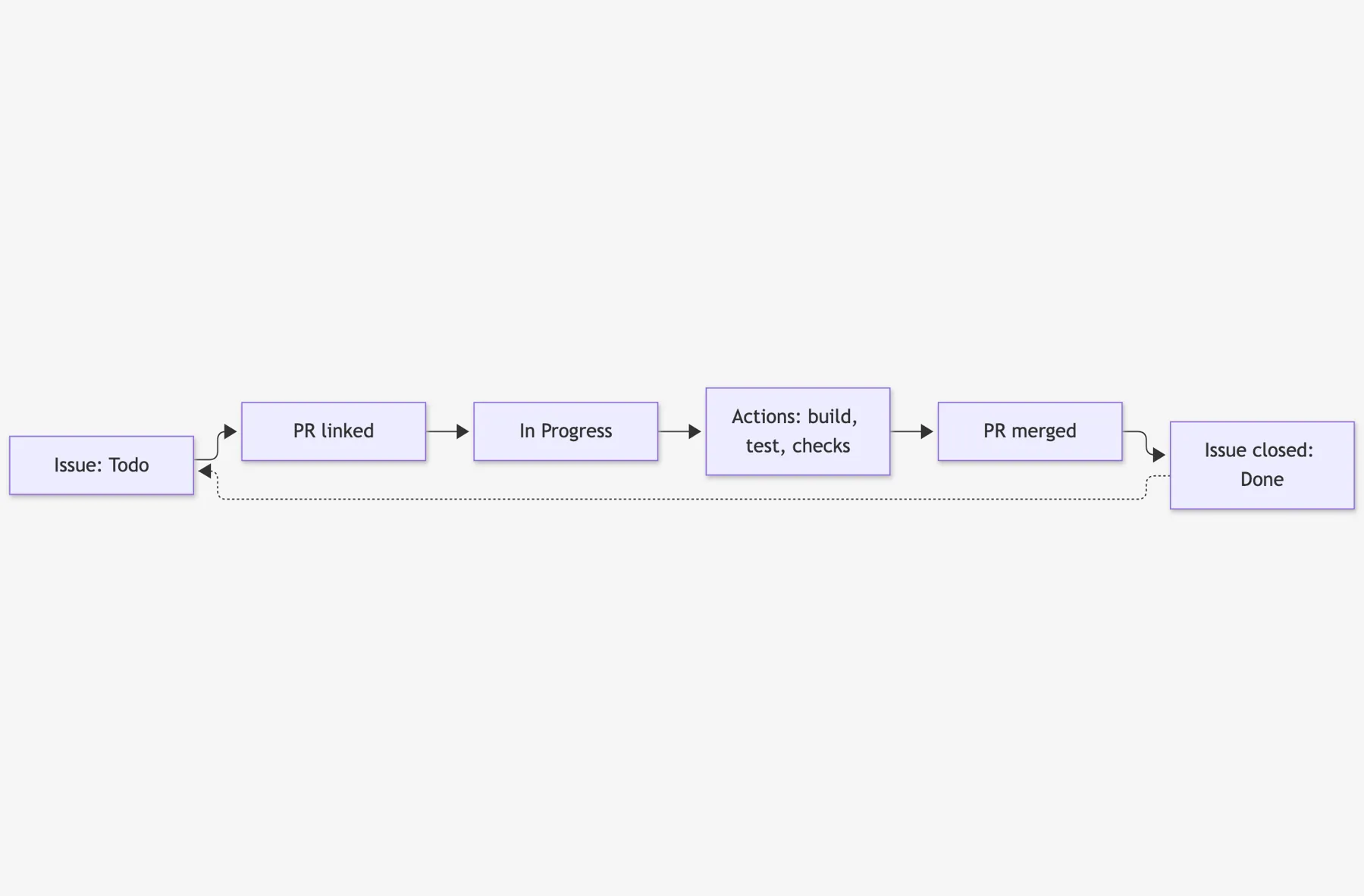
- An issue on the board. You start with an issue on your project board. It's prioritized, it's ready, and somebody picks it up.
- Link a pull request → In Progress. A developer opens a pull request and links it to that issue, and an automation can move the issue to In Progress for you. Nobody has to remember to update the board.
- Actions help enforce "done." GitHub Actions runs your builds and tests and checks on that pull request. Remember in Part 1 when I said the number one thing is a shared understanding of what done means? Actions let you enforce your definition of done before anything gets merged.
- Merge → issue closes → Done. When the pull request merges, the issue closes, and the project marks it Done. The next issue gets picked up, and around you go.
So, what are we working on right now? Are we on track? Those two questions start answering themselves, straight from the work, instead of from somebody updating a status column every morning. That's the foundation. GitHub Projects comes in on top of it to help you view and manage the big picture.
Shameless Plug
I built a product for GitHub called Honest Cheetah. It's got the tools to answer the important questions like "when will it be done?", plus AI-assisted project management and project coaching, QA testing tools, and the ability to import your work items and test cases from Azure DevOps. Give it a try and let me know what you think.
Quick Recap
Let's pull all of that back together before we go build something.
- GitHub is repo-first. GitHub started with Git, Git is about repos, and issues live in a repo. That's the tyranny of the repo.
- Real work spans many repos. Which made it hard to answer the three questions.
- Projects are a lens, not a container. GitHub Projects sits on top as a lens across those repos. The issues stay where they are, and the project is how you look at them.
- PRs and Actions close the loop. Pull requests and Actions connect your planning to your development and delivery, so the board keeps itself up to date.
Next Up: Part 3
This post and the last one were a little bit heavy on theory. Next time, we'll actually start doing and demoing stuff.
In Part 3, we'll make our first GitHub project and capture some draft issues. And we'll figure out where your issues should actually live. Yes, that's where we answer the one-repo question.
-Ben
-- Looking for help adopting GitHub Projects for your team or your company? Need an assist getting going with GitHub Actions for automated builds and releases? Want to move your stuff over to GitHub from another service? We can help. Drop us a line at info@benday.com.
GitHub Projects in 2026: The Full Series
- Part 1: It Can Do Anything. That's the Problem.
- Part 2: Why Projects and Issues Feel Weird (and Why It Makes Sense) (you are here)
- Part 3: Your First Project, From Draft Issues to Real Issues
- Part 4: Taming a Messy Backlog with Issue Types
Related: